
Sent back, withdrawn or discarded
Sent back without review
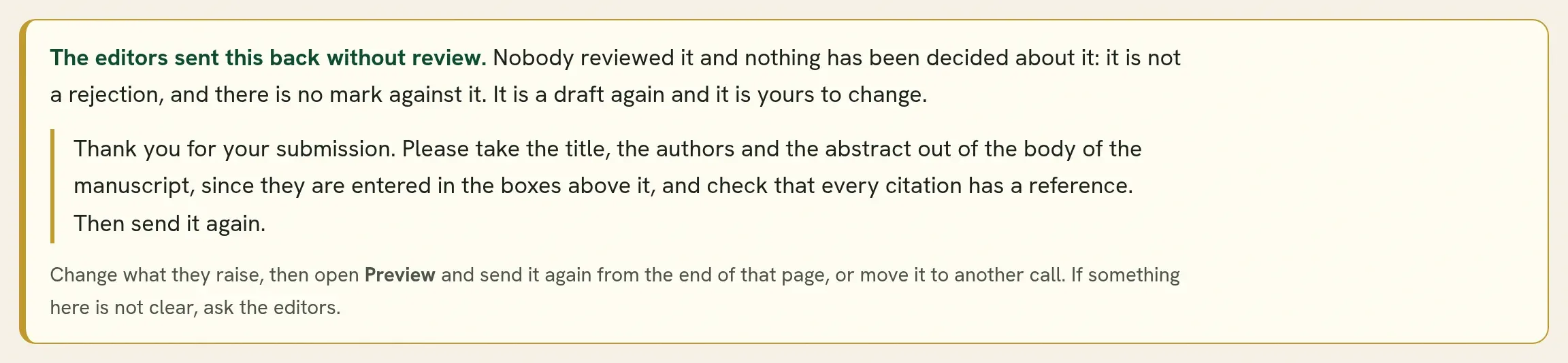
Section titled “Sent back without review”An editor can send a submission back to its authors without reviewing it, with a reason in their own words. This happens when the work is outside the scope of the call, when something the call asks for is missing, or when it belongs somewhere else.
It is not a rejection. No decision is recorded and there is no mark against the work.
- The submission is a draft in your account again.
- It keeps its tracking code, its authors and its files.
- You can change what the editors raised and submit again, or move it to another call.
If the reason is not clear, ask with Message the editorial team before you rewrite anything.
A full paper written from an accepted abstract or poster can be sent back in the same way. It does not become a draft: your abstract or poster is still accepted, and stays in the book of abstracts. The full paper is open for you again, with the editors’ reason at the top. Change what they raised and send it again, or go back to the accepted version. See From abstract to full paper.
Send it again
Section titled “Send it again”In your submissions list the work is marked Returned, and your dashboard lists it as sent back.
-
Open the submission. The note at the top gives the editors’ reason in full.
-
Change what the editors raised.
-
Press Preview and read it through.
-
At the end of the preview, press Submit for review.
Only a corresponding author can send it. It goes back to the editors as a first submission, since no round took place, and every author is told by email.
A returned submission can be sent again after the call has closed to new submissions. If the preview says it cannot be submitted yet, see Preview and submit.
Withdraw
Section titled “Withdraw”To take back a submission that is under review, open it and choose Withdraw. The editors and any reviewers are told there is nothing further to do.
If your work was accepted and you can no longer take part, tell the editors. Withdrawing accepted work removes it from the programme and the book of abstracts.
Discard a draft
Section titled “Discard a draft”While a submission is a draft that was never sent, or after you withdraw it, Discard draft removes it for good. You are asked to confirm, and it cannot be undone.
A submission that is under review must be withdrawn before it can be discarded.
Which one?
Section titled “Which one?”| You want to | Use |
|---|---|
| Send the same work to a different call | Move to another call, while it is a draft. |
| Stop a submission that is under review | Withdraw. |
| Remove a draft you no longer need | Discard draft. |
| Fix a mistake after submitting | Message the editorial team. Do not start a second submission. |
Quorum PressOpen callsRead researchSomething missing or wrong here? Tell us