
Write and design a poster
A poster has two lives. First it is a proposal in words, which the reviewers decide on. Then, once accepted, it is a designed sheet that you stand beside at the event.
Part 1: the proposal
Section titled “Part 1: the proposal”Write the proposal under four headings. It is reviewed like an abstract.
| Section | What goes in it | Length |
|---|---|---|
| Background | Why this matters and what you set out to find. | 2 to 3 sentences |
| Methods | Where the work was done, on what, and how you measured it. | 2 to 4 sentences |
| Results | What you found, with numbers. No interpretation here. | 3 to 5 sentences |
| Conclusions | What the results mean, and for whom. | 1 to 2 sentences |
A complete example
Section titled “A complete example”A whole poster proposal, as the Quorum Press preview shows it. Each section is two or three sentences, and the results carry numbers.
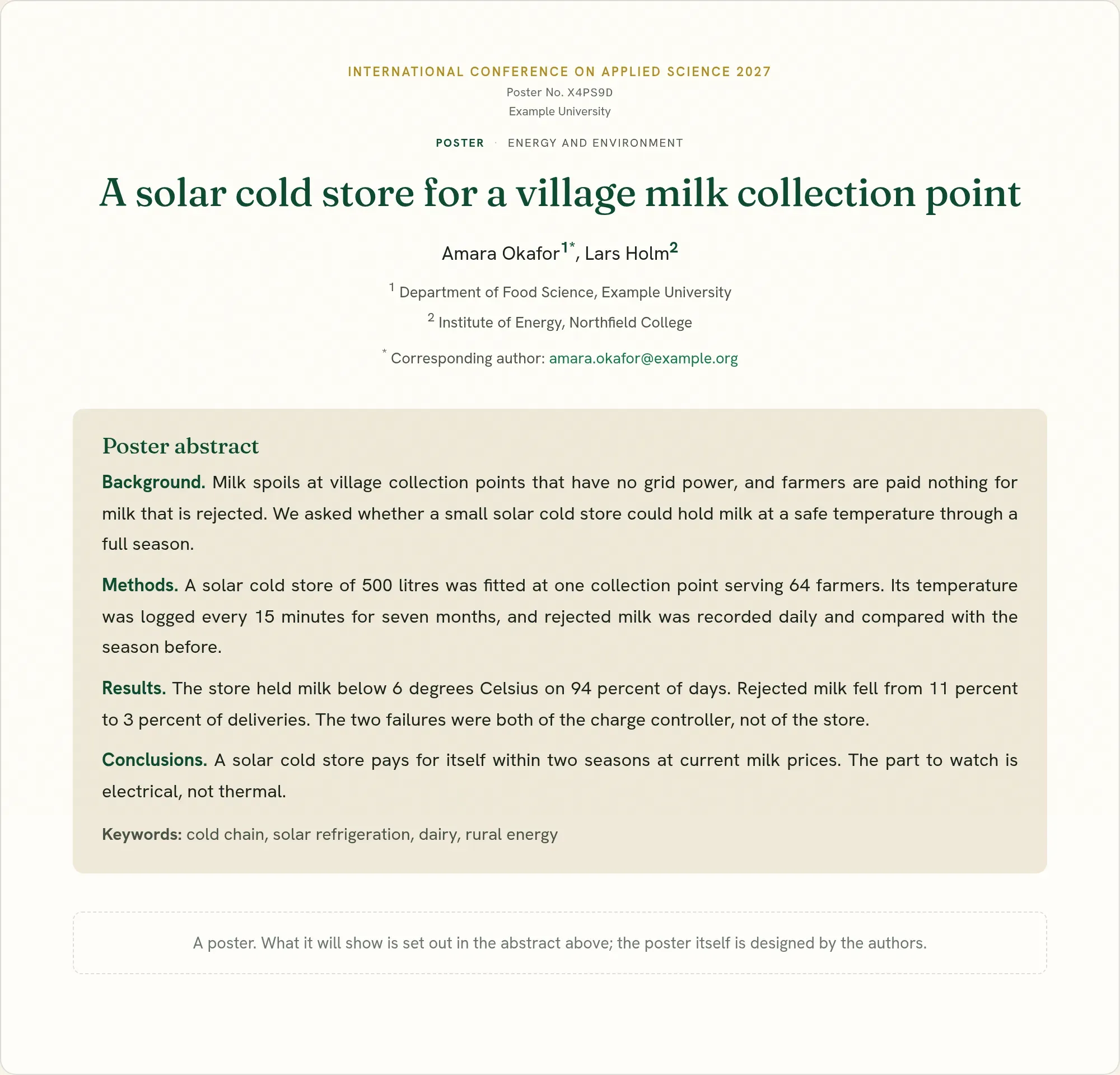
If the work is not finished, the Results section may say what you expect to have by the date of the event. Say so plainly.
Everything on the abstract page applies: results first, numbers, no claim beyond what you measured.
Part 2: the sheet
Section titled “Part 2: the sheet”You design the sheet in whatever tool you already use: PowerPoint, Google Slides, Canva, Inkscape or LaTeX. Upload it under Your poster file when it is ready. See Posters.
Before you start
Section titled “Before you start”Ask the organizers, or read the call, for:
- The size and direction. A0 portrait (841 by 1189 mm) is the most common. Some events use A1, or landscape.
- Whether it is printed or shown on a screen.
- Any required logo or header.
Set the page to the final size before you place anything on it.
What a poster is for
Section titled “What a poster is for”A poster is not a paper pinned to a board. A visitor gives it about ten seconds before deciding to stay. In that time they must be able to read the title, see the main finding, and understand one picture.
Aim for:
- 300 to 600 words on the whole sheet. Less is better.
- One main message.
- Figures that carry the story, with text in support.
Layout
Section titled “Layout”┌──────────────────────────────────────────────┐│ TITLE, in one or two lines ││ Authors · Affiliations logo │├──────────────┬───────────────┬────────────────┤│ Background │ Results │ Results ││ │ (main figure) │ (second figure)││ Methods │ │ Conclusions ││ │ │ References ││ │ │ Contact / QR │└──────────────┴───────────────┴────────────────┘- Use columns: three for portrait, three or four for landscape. The eye reads down a column, then across.
- Put the main result in the middle, at eye level.
- Leave space. About a third of the sheet should be empty. Crowded posters are not read.
- Keep to the same four headings as the proposal. Visitors know where to look.
Type sizes for A0
Section titled “Type sizes for A0”| Part | Size | Read from |
|---|---|---|
| Title | 85 to 120 pt | 5 metres |
| Authors and affiliations | 44 to 56 pt | 3 metres |
| Headings | 44 to 60 pt | 3 metres |
| Body text | 28 to 36 pt | 1.5 metres |
| Captions, references | 20 to 24 pt | 1 metre |
For A1, use about 70 percent of these. Print a section on A4 at full size and read it from an arm’s length to test it.
- One or two typefaces. A plain sans-serif face is easiest to read from a distance.
- Dark text on a light background.
- Sentences, not paragraphs. Short lists read faster.
- Left-aligned text. Justified text leaves uneven gaps.
Colour
Section titled “Colour”- Two or three colours, used the same way throughout.
- Do not rely on red against green: about one man in twelve cannot tell them apart.
- Keep photographs and backgrounds from fighting with the text.
Figures
Section titled “Figures”- Large, with thick lines and labels at least as big as the body text.
- A title that says the finding: “The dryer halves drying time”, not “Figure 2”.
- At 300 dots per inch at the printed size, or it will look blurred.
- Label lines directly where you can, in place of a separate legend.
See Figures and tables.
An example sheet
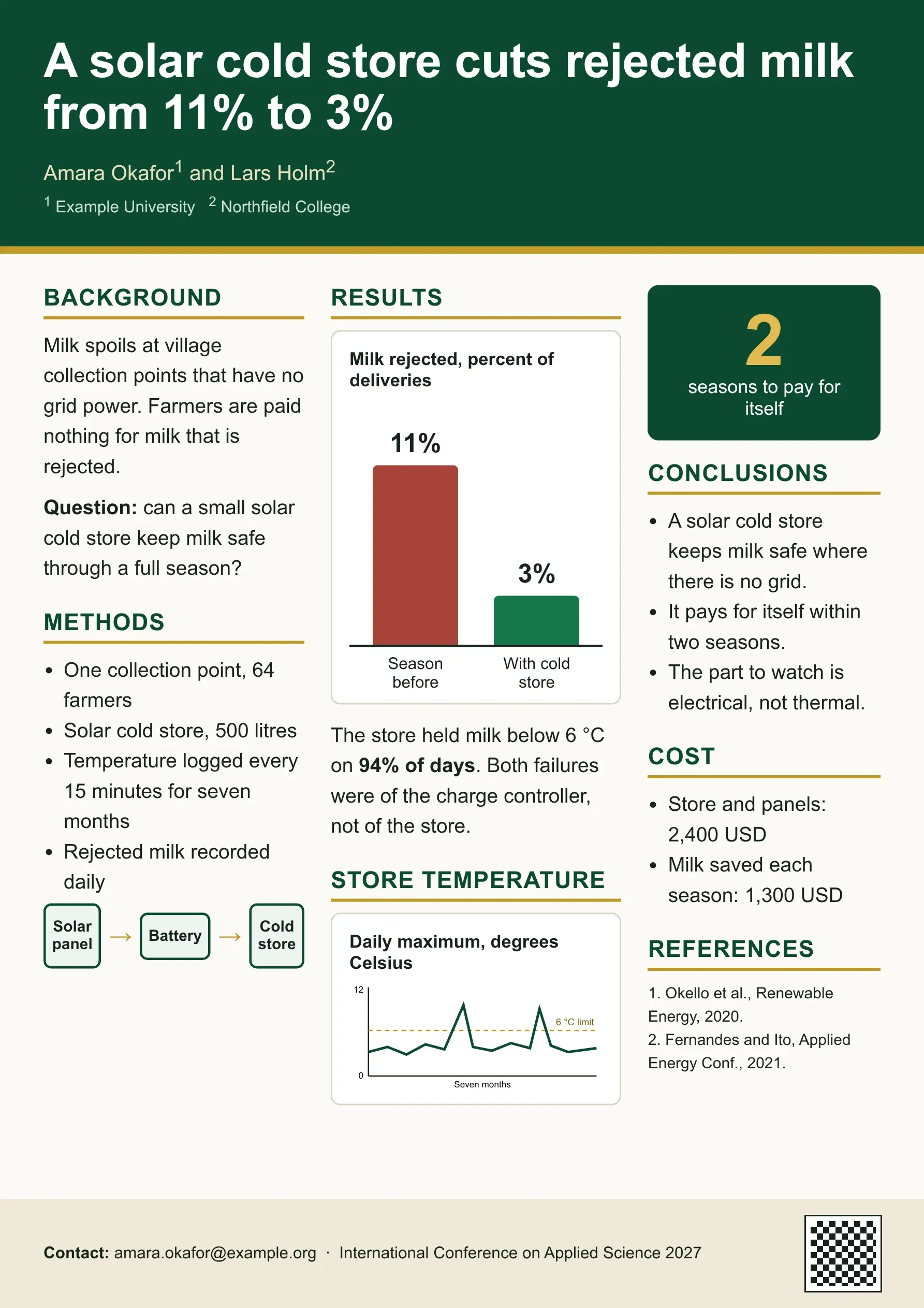
Section titled “An example sheet”The same poster, designed. The title says the finding, the main result is the largest thing on the sheet, and the text is short.
What to include and leave out
Section titled “What to include and leave out”| Include | Leave out |
|---|---|
| Title, authors, affiliations | The abstract (the poster is the summary) |
| The question | Long literature review |
| The method, as a diagram if you can | Every step of the procedure |
| Two or three key results | Every table you made |
| The conclusion, in one or two lines | A long reference list (three to five is enough) |
| Your email, and a QR code to the paper or the entry in the book of abstracts | Small print |
Save and upload
Section titled “Save and upload”- Save as PDF. It keeps the type and the size. PNG and JPG are also accepted.
- Check the file size. A PDF can be up to 10 MB. Pictures are made smaller for you.
- Open the saved file and read it at full size before you upload it.
Part 3: present it
Section titled “Part 3: present it”- Prepare a one-minute talk: the question, what you did, what you found, why it matters.
- Stand beside the poster, not in front of it.
- Ask the visitor what they work on, and say what will interest them.
- Carry small copies or a QR code, so visitors can take the work away.
- Note the questions you are asked. They are free review of your work.
Checklist
Section titled “Checklist”- The title can be read from five metres.
- A visitor can find the main finding in ten seconds.
- No text is smaller than 20 pt at A0.
- Every figure has a title that says what it shows.
- Under 600 words.
- Authors, affiliations and a contact address are there.
- The file is a PDF at the size the organizers asked for.
Quorum PressOpen callsRead researchSomething missing or wrong here? Tell us