
Registration fees and the desk
A registration fee is optional. Until you set one up, nothing about fees is asked of anyone.
Set up the fee
Section titled “Set up the fee”Open your conference, then Participants, and set:
| Setting | What to give |
|---|---|
| Rates | The amount and currency for each kind of participant, for example standard and student, in person and online. |
| Tiers and dates | Early and late rates, with the date each ends. |
| Groups of countries | Which countries pay which rate, if rates differ by country. |
| Payment instructions | How to pay you, in your own words: bank details, mobile money, a payment link. |
| What an unpaid fee holds back | Any of: the badge and certificate, the place in the programme, the entry in the book of abstracts, and publication. Publication is held only if you tick it. To release everything for one submission without payment, waive its fee on Registrations. |
| When it is asked | After acceptance, by default. |
The letter of acceptance is never held back by a fee.
Who is charged
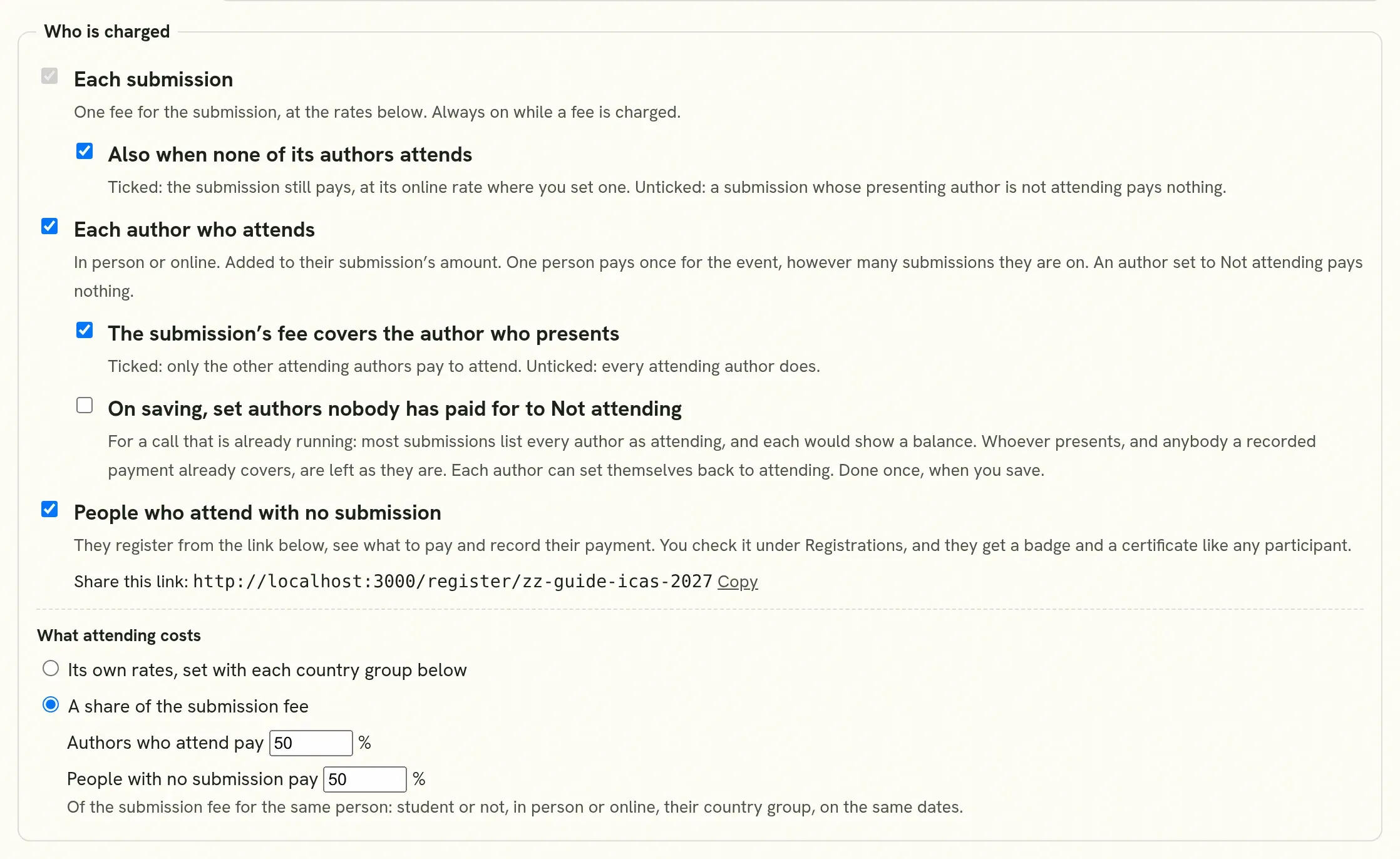
Section titled “Who is charged”Under Who is charged you choose what the fee is asked for.
| Choice | What it does |
|---|---|
| Each submission | One fee for the submission. Always on while a fee is charged. |
| Also when none of its authors attends | Ticked, a submission still pays its own fee when its presenting author is not attending, at its online rate where you set one. Unticked, such a submission pays nothing. |
| Each author who attends | Each author attending in person or online also pays to attend. It is added to their submission’s amount. |
| The submission’s fee covers the author who presents | Ticked, only the other attending authors pay to attend. Unticked, every attending author does. |
| People who attend with no submission | People who come only to listen register from a link you share, see what to pay and record their payment. |
What attending costs is set in one of two ways:
- Its own rates: a second table in each group of countries, with the same early and late dates as the submission’s rates.
- A share of the submission fee: a percentage, for example 50, of the rate the submission pays. Authors who attend and people with no submission each have their own percentage.
Three things follow, and authors are told each of them on their page:
- A person on several submissions pays to attend once, on the first of them. The others show whose code it was paid under.
- An author set to Not attending pays nothing. Any author can set this for themselves, and a corresponding author for everybody on the submission.
- A submission is settled only when its total is covered: its own fee and its attending authors. Until then it shows what is still to pay.
What a part payment holds back. A payment goes to the submission first, which covers whoever presents where the conference set it so. What is left counts first for the person who paid it, then for the other attending authors in order. Whoever recorded a payment can name another attending author under Counts first for, beside the payment. Once the submission’s own fee is covered, its place in the programme and in the book of abstracts is not held. Only the badge and certificate of an author who is not covered yet wait.
Starting on a call that is already running. Most submissions will list every author as attending, and each would show a balance. Tick On saving, set authors nobody has paid for to Not attending, then save. It is done once.
- Whoever presents is left as they are, and so is anybody a recorded payment already covers.
- The settings say how many authors it would change before you save.
- Each author can set themselves back to attending on their submission’s page.
Then write to your authors and ask each to check how they attend. On Registrations, Attending and not paid for copies the addresses of the authors who are set as attending and not covered.
One person, twice. Where the same ORCID, the same name or a similar name is on two submissions under different email addresses, the row says so, because that person would be charged twice. Where one email address is given for two different names, it says that too. Nothing is changed for you: correct the address on the submission if it is one person.
On the desk, the line under each amount shows what it is made of, for example “KES 5,000 submission + KES 1,000 Cara”.
Rates that depend on an answer
Section titled “Rates that depend on an answer”A student rate, or a rate by country, is given on the author’s word: Quorum Press asks the question and does not ask for a document. If you intend to check, say so in your Payment instructions, for example “Students: bring your student card to the registration desk”, and check it when they arrive. Authors who answer that they are students are told on their page that proof may be asked for, and the guide tells them what to carry.
Where an answer was wrong, correct it on the desk with Change these. The amount owed is worked out again, and the row shows what is still to pay.
People with no submission
Section titled “People with no submission”Tick People who attend with no submission and save. The settings then show a link to share: put it on your website and in your emails. Your conference is also listed under Attend for everybody with an account.
From then on the link is in three more places, by itself:
- Your public page has a Register to attend button, under Submit to this call, and again under Registration & fees.
- Your conference’s page has Copy link to register to attend, beside Copy call link.
- Public page, under Registration & fees, shows the address and a Copy button.
Untick the box and all of them go.
A person who opens the link signs in, or creates an account, gives their name, where they are coming from and how they attend, and sees the amount. They pay you, and record the payment. See Attend a conference without a submission.
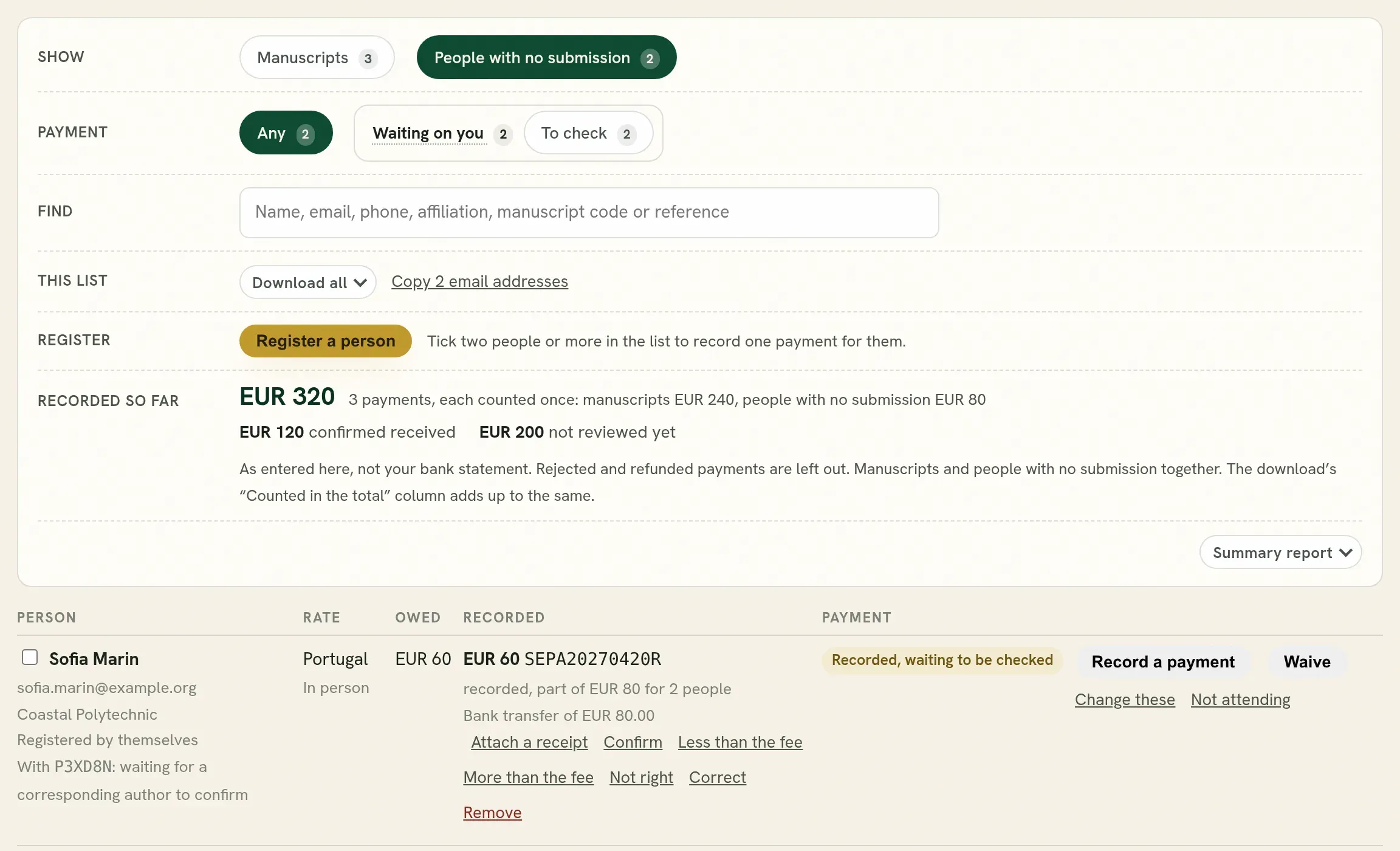
On Registrations, the first row of the desk, Show, has Manuscripts and People with no submission, each with its count. Press People with no submission and the desk shows them in place of the manuscripts, with no scrolling: Payment shows one group at a time (Still owes, Waiting on you, Nothing to do, Not attending), Find searches them, This list downloads them or copies their addresses, and Register adds somebody yourself. Press Manuscripts to go back. A link to the page ending in #attendees opens on them. The search on the manuscripts finds them too: when a name, email or code belongs to a person with no submission, it says so, and pressing that shows them.
What a row’s button opens, such as the payment form or Change these, opens on a line directly under that row.
| Control | Use |
|---|---|
| Confirm | The payment is on your statement. |
| Not right | It is not. Give a reason: the person reads it in your words. |
| Record a payment | Enter a payment the person told you about, or made at the desk, with the receipt if you have one. To record one payment for several people, tick them and press Record one payment for. |
| Waive | For someone who should not pay: a guest, a sponsor, a volunteer. |
| Register a person | Register somebody yourself, from details they sent you. They are told by email. |
| Change these | Correct a person’s name, country, or how they attend. |
| Not attending / Put back | Take a person off the list, or return them. What was recorded stays. |
| Receipt | Open the receipt the payer uploaded. Only your team can open it. |
| Attach a receipt / Replace the receipt / Remove the receipt | Add the slip that came later, put another in its place, or take it down. The payment stays on the record. |
| Also on a payment | Use |
|---|---|
| Less than the fee / More than the fee | The money is there, and it is not the amount asked. It still counts, and the row shows what is still to pay. |
| Correct | Fix the reference or the note, for example where an account number was typed where the transaction code goes. Where your team entered the payment, its amount can be corrected too; an amount the person recorded stays theirs, so mark it short or over instead. What it said before is kept in the activity log. |
| Remove | Take a payment off the record, for one recorded twice or by mistake. It asks first, stops counting at once, and Put it back above the list returns it as it was for ten minutes. Somebody who recorded it themselves is told. |
A transaction code is recorded once at an event. Entered again, for a person or on a submission, it is refused with where it is already recorded, since one transfer counted twice makes every total wrong. If one payment covers a submission and an author’s own registration, record it once and write the rest in its note.
A row is marked when a person with no submission has the same or a similar name as an author at your event under another address. It may be one person paying the lower fee, or two people. You decide.
Where a corresponding author listed a person as an author by mistake, Undo beside it takes them back off the authors. They stay registered.
One person can register several people and pay for them with one payment. The table then says part of the whole amount on each of their rows, and one Confirm answers the whole payment. To record one payment for several people yourself, tick them and press Record one payment for.
The spreadsheet also has a tab, Attending authors, with every author set as attending: their address, how they attend, where their fee falls, and whether what is recorded covers them. Beside the table, Copy email addresses takes the addresses of everybody in it, or only of those still to pay. Participants has the same button for the people on its list.
Somebody who is not an author, such as a sponsor, can record a payment for a submission with its tracking code. It arrives on the submission’s row marked not an author, to check like any other.
They are in your downloads as well: the manuscripts’ This list, when it is not narrowed, carries a row for each of their payments, titled “Attending, no submission”, and their own This list downloads them alone; the Checked sheet is read for them too, and the Summary report counts them.
Each of them becomes a participant, with a badge and a certificate like an author’s. Where you hold badges or certificates back for an unpaid fee, theirs waits until their payment is recorded.
A person who names a submission
Section titled “A person who names a submission”A person may give the tracking code of a submission they come with. A corresponding author of that submission is asked to confirm or decline, and the table shows the answer. It never stops the person registering or paying. Once confirmed, they keep that submission’s rate dates, for example its early rate. They are not made an author.
An author of a submission at your event cannot register this way: they are sent to their submission, so that nobody is charged twice.
What authors do
Section titled “What authors do”Authors of accepted work answer the few questions the rate depends on, see the amount, pay you, and record the payment with its reference. They may add a receipt. See Registration fee and payment.
The desk
Section titled “The desk”Open Registrations on your conference.
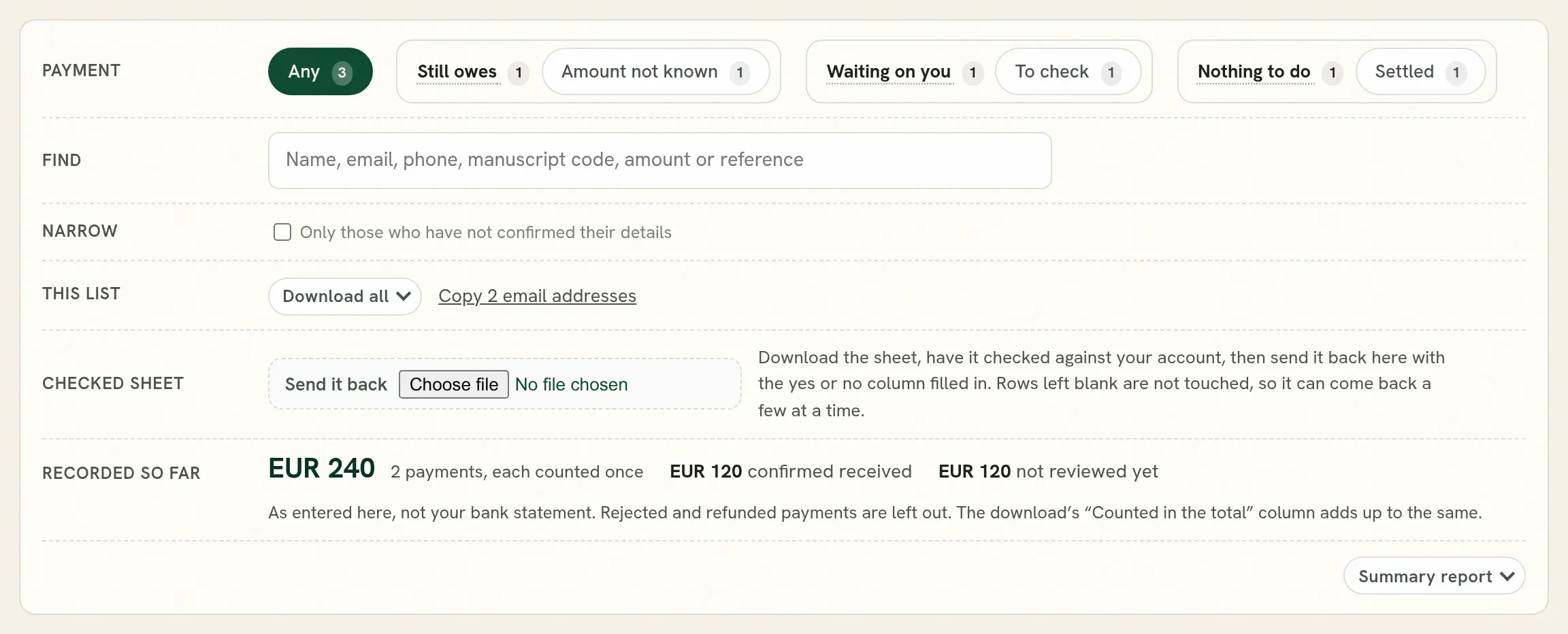
| Row | What it does |
|---|---|
| Show | Manuscripts, Accepted only, or People with no submission. Only there when people can register with no submission; otherwise Manuscripts offers all or accepted only. |
| Payment | Narrows the list: still owes, amount not known, waiting on you to check, settled. |
| Find | A name, email, phone number, tracking code, amount or reference. |
| Narrow | Only those who have not confirmed their details. |
| This list | Download the list as it is narrowed, or copy the email addresses in it. |
| Checked sheet | Send back the sheet your accounts office filled in. |
| Recorded so far | The money for the whole call, manuscripts and people with no submission together, each payment counted once: how much is confirmed, how much is not reviewed yet, and how much is still to come from those who owe. Where people with no submission have paid, it says how much is theirs. It is the same on both lists. |
Summary report, at the foot of the panel, sets these figures down as a PDF or a spreadsheet.
Check a payment
Section titled “Check a payment”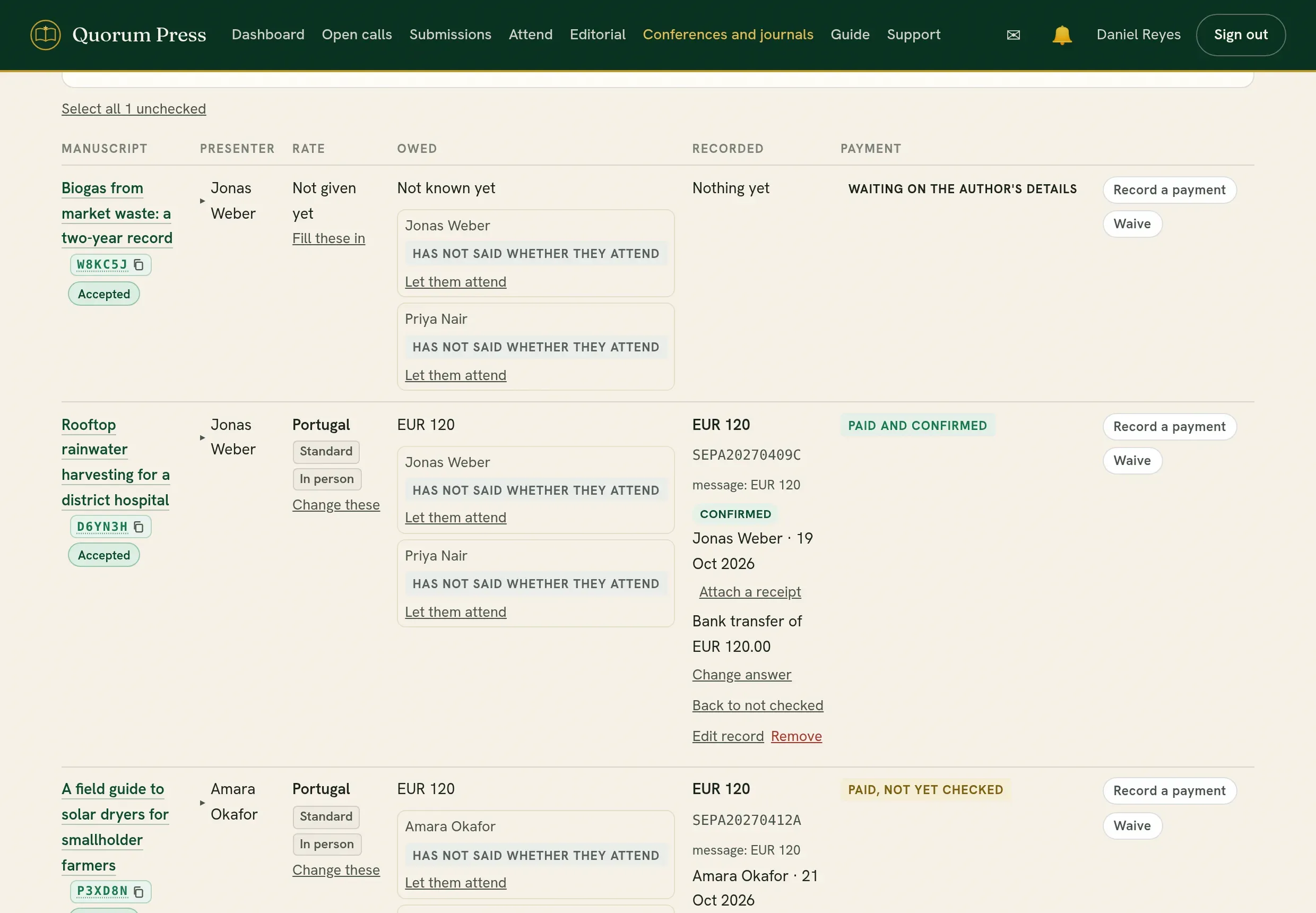
-
Find the payment on your bank statement or your mobile money record, by its reference and amount.
-
Press Confirm if it is there.
-
Press Not right if it is not, and give a reason. The authors read the reason in your words and can correct the record.
The other controls on a row:
| Control | Use |
|---|---|
| Record a payment | Enter a payment for an author who told you by email or paid at the desk. The record says your team entered it. |
| Waive | For someone who should not pay: an invited speaker, a sponsored participant. You can waive the whole fee or the balance. |
| Fill these in / Change these | Give or correct the answers the rate depends on, for an author who sent them by email. |
| Edit record | Correct the reference, the note or the currency. |
| Change answer / Back to not checked | Undo a confirmation or a refusal. |
| Remove | Take a record away. You are asked to confirm, and there is a short time to undo. |
| Receipt | Open the receipt the author uploaded. Only your team can open it. |
| Attach a receipt | On a payment with no receipt, add the slip, screenshot or PDF that came later. It goes on every manuscript the same transfer paid for. |
Everybody on a submission, and waiving one person
Section titled “Everybody on a submission, and waiving one person”Where you charge each author who attends, a submission’s row lists everybody on it: who presents, who attends in person or online, who said they are not attending, and where each person’s own fee stands.
| It says | What it means |
|---|---|
| Covered by the submission’s fee | Whoever presents, where the submission’s fee covers them. |
| Paid for | What has been paid on the submission reaches this person. |
| Not paid, with the amount | They attend and nobody has paid for them. Their badge and certificate wait, and nobody else’s. |
| Fee waived | You decided their fee is not owed. |
| Not attending, or has not said | Nothing is charged for them, and they have no badge. |
- Waive their fee takes that one person’s fee off what the submission owes. The submission’s own fee and the other authors’ fees stay as they are. Write why: it is kept with the record. Take the waiver back makes it owed again.
- Let them attend is for a co-author who said they are not attending, or never said, and came. Choose in person or online, and whether their fee is waived or owed. Then press Add attending authors on the participants’ list to give them a badge.
- A waiver is for the person at the event, not for one submission: somebody on two submissions is charged on neither.
- The search finds a submission by any of its authors’ names or addresses, not only the presenter’s.
Waiving one person is different from Waive on the submission, which excuses the whole fee, and from Give it despite the fee on the participants’ list, which hands over a certificate and leaves the fee owed.
Things to look at
Section titled “Things to look at”The Inspect row on Registrations finds payments that need a second look, across the piles:
| Filter | Shows |
|---|---|
| Can be put right | Details the desk can correct in one press, such as a phone number without its country code. |
| Same code elsewhere | A transaction code also recorded on another submission. |
| Message disagrees | The pasted message says a different amount, code or currency from the record. |
| No message | A payment recorded with no confirmation message. |
| No message or receipt | A payment with nothing to check it against: no message and no receipt. Ask the payer for one. |
| One payment, several manuscripts | A transfer shared between submissions. |
| Phone to check | A contact number that does not look right for the country chosen. |
| Has a balance / Paid more than owed | Part paid, or paid more than the fee. |
Each count is what pressing the filter shows in the pile you are looking at. When other piles hold more, the count says so, for example “0 of 2”, and more in other piles: show them shows them all.
Record a payment for an author
Section titled “Record a payment for an author”Some authors tell you about a payment by email, or pay at the desk, and never record it themselves. Enter it for them.
-
On the desk, find the submission. Find takes a name, an email address, a tracking code or a reference.
-
On its row, press Record a payment. The form opens on a line of its own directly under that row.
-
Under Payment confirmation, paste the payer’s message, or the line from your bank statement. What can be read from it, the amount or the code, is filled in for you. Type in whatever was not.
-
Check Transaction code, Amount paid and Currency.
-
If the payment was for more than one submission, give the other tracking codes under This payment also covers.
-
Add a receipt if you have one: choose the file, or drop it on the box marked Receipt, slip or screenshot. Press Record this payment. A receipt that comes later can be added on the payment with Attach a receipt.
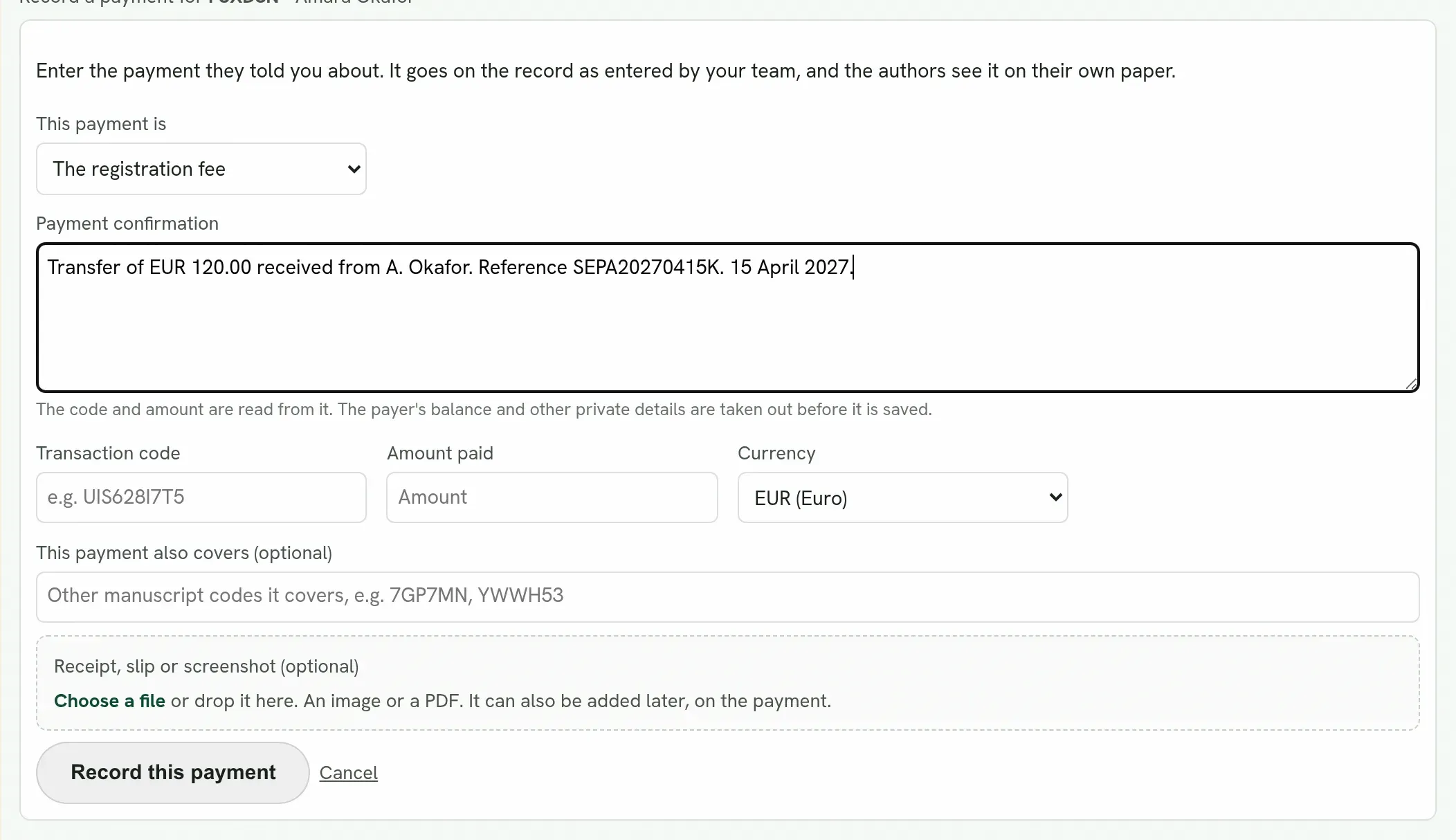
The record says your team entered it, and the authors see it on their own submission. A payment you entered from your own statement can then be confirmed like any other.
Record an author’s details for them
Section titled “Record an author’s details for them”The amount cannot be worked out until the author has said where they are coming from and whether they are a student. Where an author sent you these by email, enter them.
-
On the row, press Fill these in. Where answers exist already, the button is Change these.
-
Choose the country under Coming from, and In person or Online under Attending.
-
Add a contact number if they gave one, and tick They are a student if they are.
-
Press Save these details.
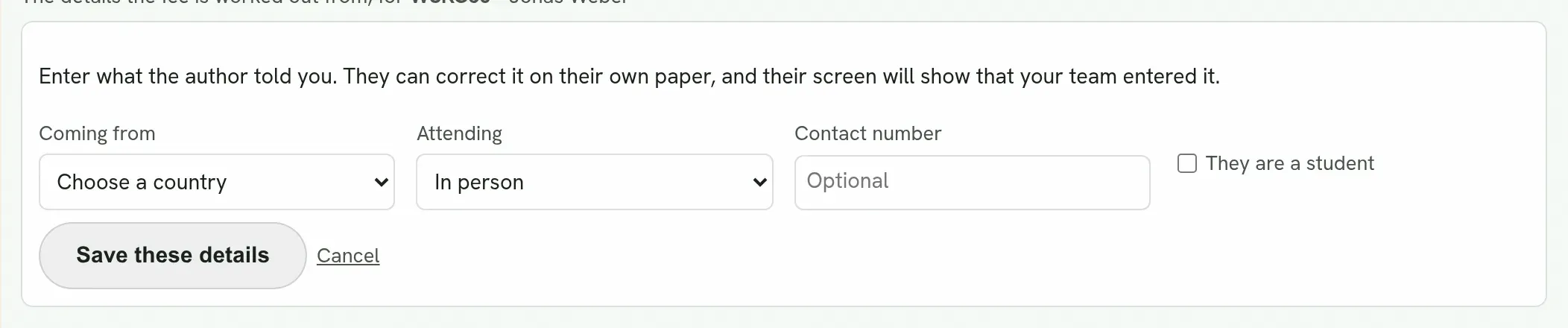
The amount owed appears on the row at once. The author can correct the answers on their own submission, and their page shows that your team entered them.
Mistakes the desk finds for you
Section titled “Mistakes the desk finds for you”Where something is plainly wrong, the row is marked and offers Put it right: for example the same payment recorded twice, or a currency that does not match the fee. It shows exactly what will change before you press it.
One payment for several submissions
Section titled “One payment for several submissions”An author can pay once for several submissions. The amount is shared between them and counted once in the total.
Work with your accounts office
Section titled “Work with your accounts office”- Download the sheet from This list.
- Send it to your accounts office. They fill in the yes or no column against the statement.
- Upload it under Checked sheet.
Only rows that were answered are changed, so the sheet can come back a few at a time. Sending the same file twice changes nothing.
A colleague can be given the Registrar role to do this without reaching any manuscript or review. See People and roles.
Reports
Section titled “Reports”Summary report, at the foot of the desk’s panel, gives the counts for manuscripts and for people with no submission, and for each currency the money expected, recorded, confirmed and still to come, as a PDF or a spreadsheet. It has no names.
Quorum PressOpen callsRead researchSomething missing or wrong here? Tell us