
Book of abstracts and ranking
The book of abstracts is the accepted work of your conference as one book: on the web for anybody once you release it, and as a file to print. It is made for you from the accepted submissions.
Open Book of abstracts and ranking on your conference.
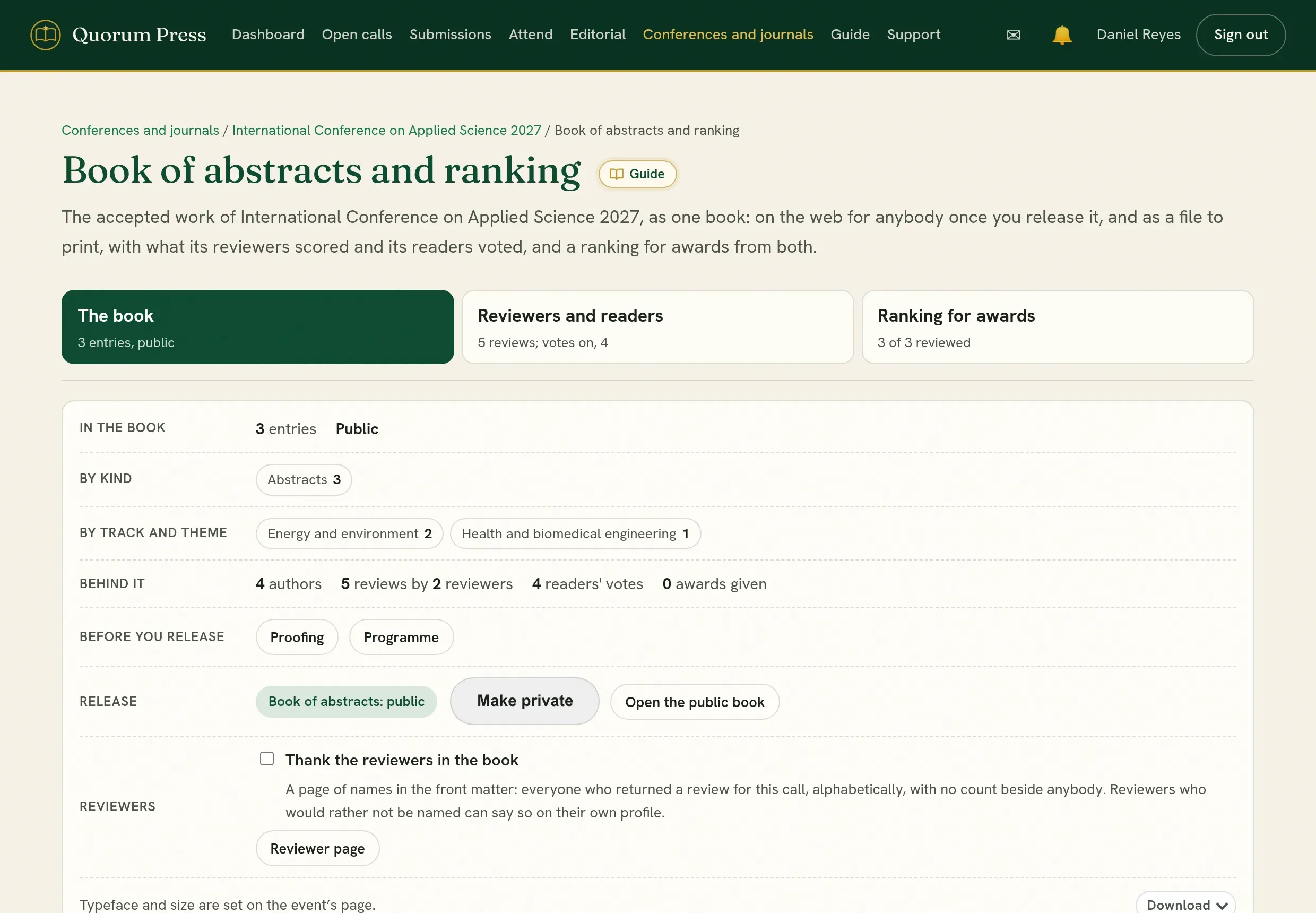
The page has three parts, each a tab at the top. Each tab says where its part stands, for example how many reviews and votes there are or how many awards are given. Press one to open it.
| Tab | What it holds |
|---|---|
| The book | What is in the book, by kind and by track, what is behind it, the release, the files, and a list of every entry. |
| Reviewers and readers | Two tabs of its own. Reviewers: what the reviewers scored, for the whole book and entry by entry. Readers: the vote, its settings and its results. |
| Ranking for awards | The entries in order for an award, with the corrections that make the order fair. |

What is in the book
Section titled “What is in the book”- Every accepted submission, grouped by track and numbered.
- Each entry has the title, the authors and affiliations, the abstract and the keywords, and, once the work’s DOI is registered, its DOI as a link under them. See Where a work’s DOI shows.
- Newly accepted work appears by itself. Nothing has to be rebuilt.
- If you chose that an unpaid fee holds back the entry, that work is left out until the payment is confirmed. The page tells you how many are held back.
- An abstract that is being turned into a full paper keeps showing what was accepted until the full paper is accepted.
The tab counts the entries by kind and by track, and says what is behind the book: how many authors, how many reviews by how many reviewers, how many votes, and how many awards. Before you release leads to proofing, to the programme, and to any entries held back for the fee.
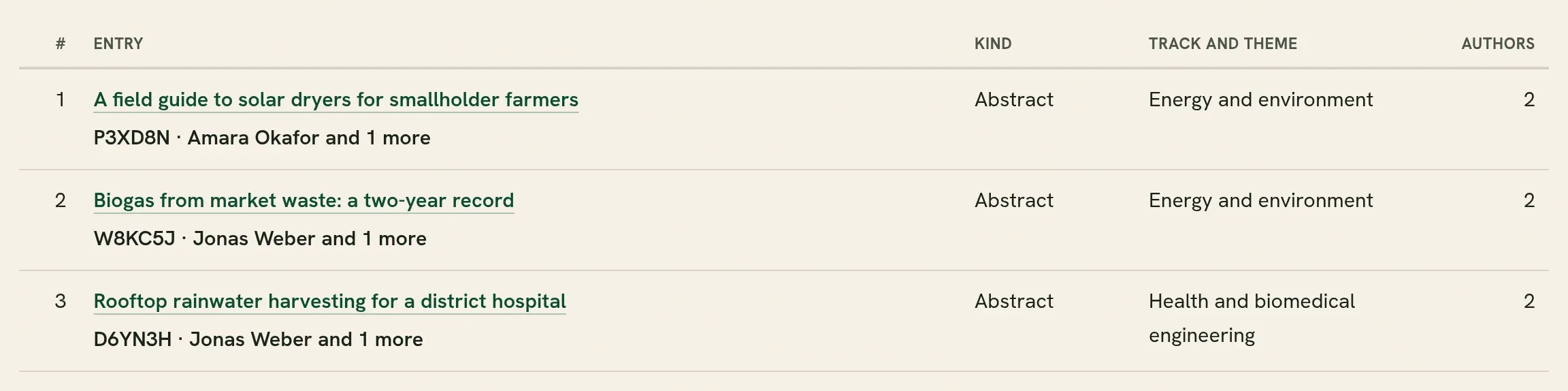
Under that, What is in the book lists every entry with its kind, its track and how many authors it names. Use it to check that nothing is missing and nothing is there twice. Type in Find to look for a title, a tracking code, an author or a track. A title opens the entry in the book.
Leave a work out of the book
Section titled “Leave a work out of the book”Under the list, Leave a work out of the book is for an accepted work whose abstract should not be printed, whether or not its authors have registered: they asked for it, it is going to a journal that wants it unpublished, or something about it is still being asked. Find it by tracking code or title, tick it, add a note if you wish, and press Leave it out of the book.
The work stays accepted and keeps its place in the programme. Only the book passes over it, on the web and in every file. The note is for the organizers and is shown to nobody else. Put back returns it.
A work on hold is kept out of the book as well, and is listed there with a link to where the hold is lifted. The counts at the top of the tab say how many are left out and how many are on hold.
More in the book
Section titled “More in the book”A book carries more than abstracts: a welcome, the committees, the keynote speakers, and those who supported the event. More in the book, under The book, sets these.
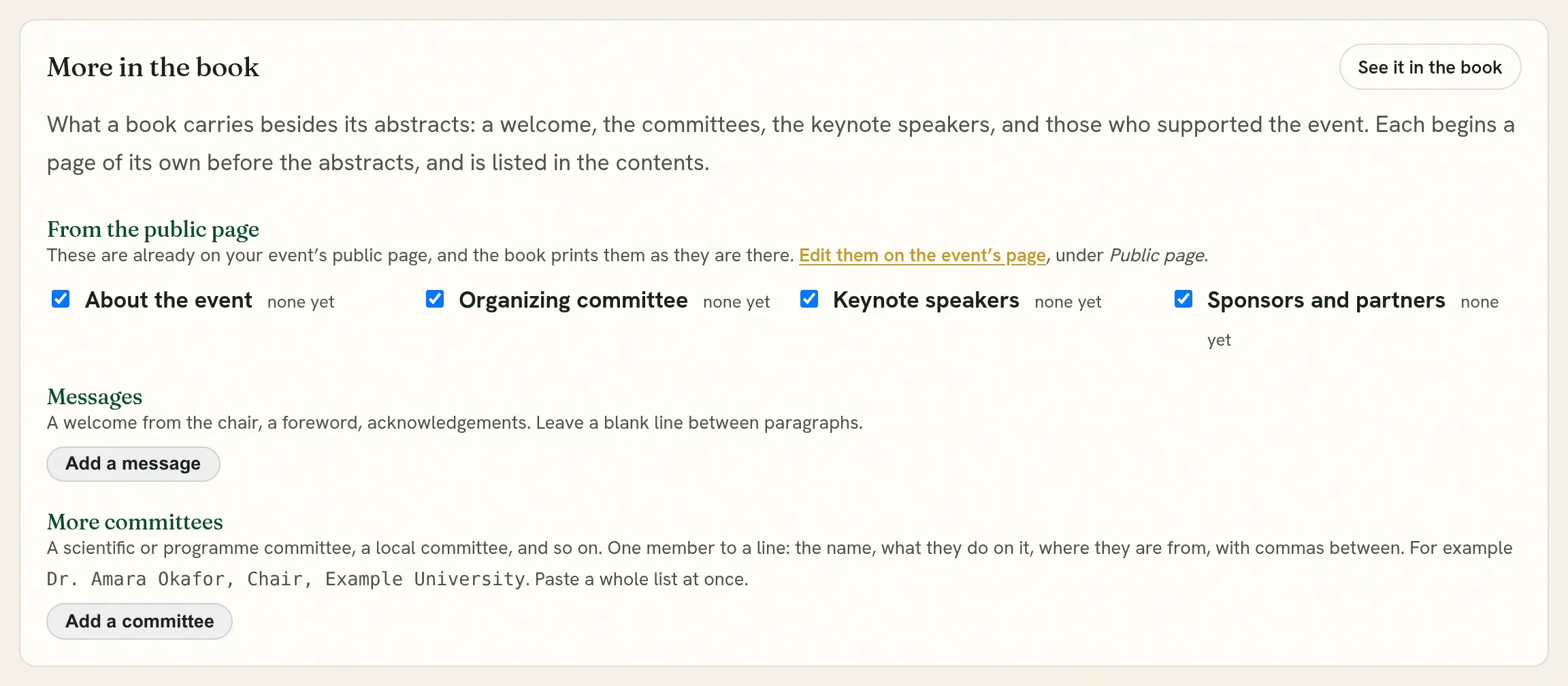
From the public page. Your event’s public page already has its committee, its keynote speakers, its sponsors with their logos, and a text about the event. The book prints them as they are there, so you enter them once. Each has a tick, and is printed unless you untick it. To change the names or the logos, edit the public page on the event’s own page.
Where each full paper is published. Under an abstract whose full paper is placed in a journal or a volume, a line saying so: Full paper to appear in the journal, or published in it once its DOI is registered. It is off unless you tick it. The book is the record of what was presented, and a line naming a journal under some entries can sway how readers read and vote. The paper’s own page and the folder for your website say where it is published either way.
Messages. A welcome from the chair, a foreword, acknowledgements. Press Add a message, give it a title, the text, and who it is from. Leave a blank line between paragraphs. Choose whether it stands before the abstracts or after them.
More committees. A scientific committee, a programme committee, a local committee. Press Add a committee, name it, and paste its members one to a line: the name, what they do on it, and where they are from, with commas between.
Dr. Amara Okafor, Chair, Example UniversityProf. Lena Fischer, Secretary, Another UniversityJuma Otieno, Example InstituteThe page says how it read the first lines, so you can see that a role was taken as a role. A line with two parts is a name and where they are from, unless the second part reads as a role such as Chair or Secretary.
In the book, each of these begins a page of its own before the abstracts and is listed in the contents, in this order: messages, the text about the event, the committees, the keynote speakers, the sponsors. They are in the PDF, the Word file and the LaTeX source as well as the book on the web. It saves as you type.
Release
Section titled “Release”The book is private until you press the release control. Make private takes it back. Open the public book shows it as readers see it.
Released books are also listed under Books of abstracts.
Download
Section titled “Download”Download gives the book as a file:
| File | What it is for | Who can take it |
|---|---|---|
| PDF, with the QR code | To share and to print. The code on the cover leads to the book online. | Anybody, once the book is released |
| PDF, without the QR code | A clean copy for a printer. | Organizers |
| Word (DOCX) | To edit the text, or to hand to a designer. | Organizers, where your plan includes the editable downloads |
| LaTeX (ZIP) | The source of the whole book, to set it in your own style. Open it in Overleaf, or compile main.tex twice on your own computer. |
Organizers, where your plan includes the editable downloads |
The PDF carries the name of your event and institution at the head of each page, and page numbers. All three hold the same entries with the same numbers, the contents and the author index.
The Word file and the LaTeX source are working copies. They are plainer than the PDF, because they are meant to be restyled.
The typeface and size are set on the conference’s page.
Thank the reviewers
Section titled “Thank the reviewers”Tick Thank the reviewers in the book to add a page of names at the front: everyone who returned a review for this call, in alphabetical order, with no count beside anybody. A reviewer who would prefer not to be named can say so in their own profile.
Corrections
Section titled “Corrections”Check the book before you release it. Proofing on the conference’s page lists what looks wrong across the accepted work, such as names in capitals, affiliations written differently, or missing emails, and offers corrections. Editors can correct accepted work directly, and the authors are told what changed.
What the reviewers scored
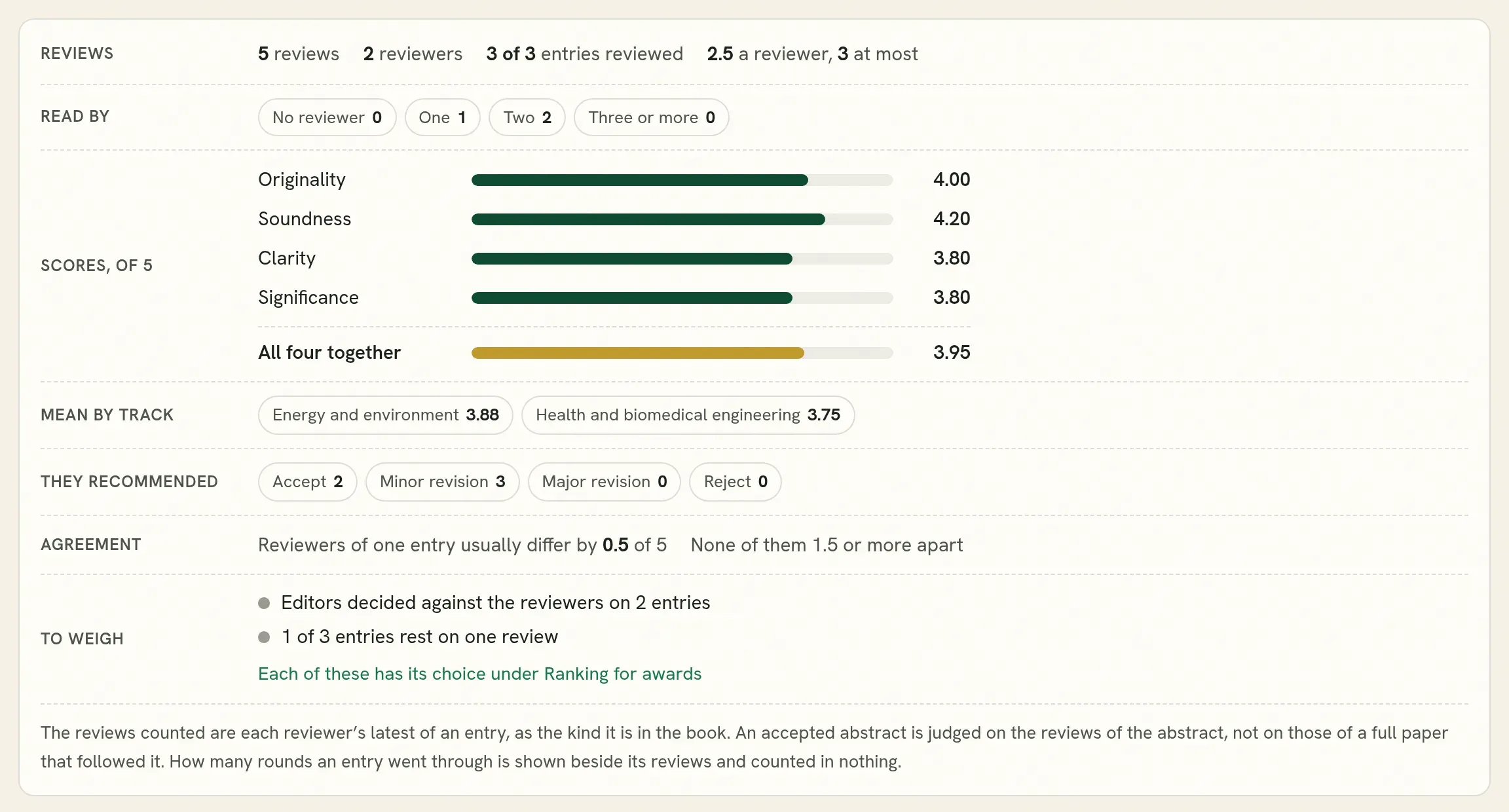
Section titled “What the reviewers scored”Open the Reviewers and readers tab. It has two tabs inside it, Reviewers and Readers, each with its figure beside its name. Reviewers is the one open first, because every event has them and theirs is the reading the work was accepted on.

| Line | What it tells you |
|---|---|
| Reviews | How many reviews, by how many reviewers, and how many entries were reviewed. Also how many reviews one reviewer usually wrote, and the most. |
| Read by | How many entries had no reviewer, one, two, or three and more. An entry read by one person rests on one opinion. |
| Scores, of 5 | The mean of originality, soundness, clarity and significance across the book, and all four together. The lowest bar is what the work of this event was weakest on. |
| Mean by kind and by track | Whether one kind or one track was scored higher than another. |
| They recommended | What the reviewers recommended. The decision was the editors’. |
| Agreement | How far the reviewers of one entry usually differ, and how many entries they read very differently. |
| Rounds | How many entries were reviewed in more than one round, and the most rounds any went through. Shown where any entry had more than one. |
| To weigh | What the reviews themselves show to be worth a second look, for example a reviewer who gave everything the same score. Each has its choice under Ranking for awards. Shown only when something is found. |
Nothing here is corrected or ranked, and no reviewer is named. The reviews counted are each reviewer’s latest review of an entry, as the kind it is in the book. A reviewer who read a revision is counted on that reading and not on the one before, and a reviewer who read the entry once is still counted. An accepted abstract whose full paper is now under review is judged on the reviews of the abstract: the full paper’s rounds and reviews are left out until the full paper is accepted and takes the abstract’s place.
Rounds are shown and never counted. An entry that was revised and reviewed again is judged on its reviewers’ latest reviews, the same as an entry accepted at once. What the editors decided at each round is shown beside it and is not counted either. Counting rounds against an entry would punish authors for improving their work, and counting them for it would reward work that needed more help.
Entry by entry
Section titled “Entry by entry”One line for each entry, with its reviews, the mean of each of the four scores, its mean, its lowest and highest review, and its votes.
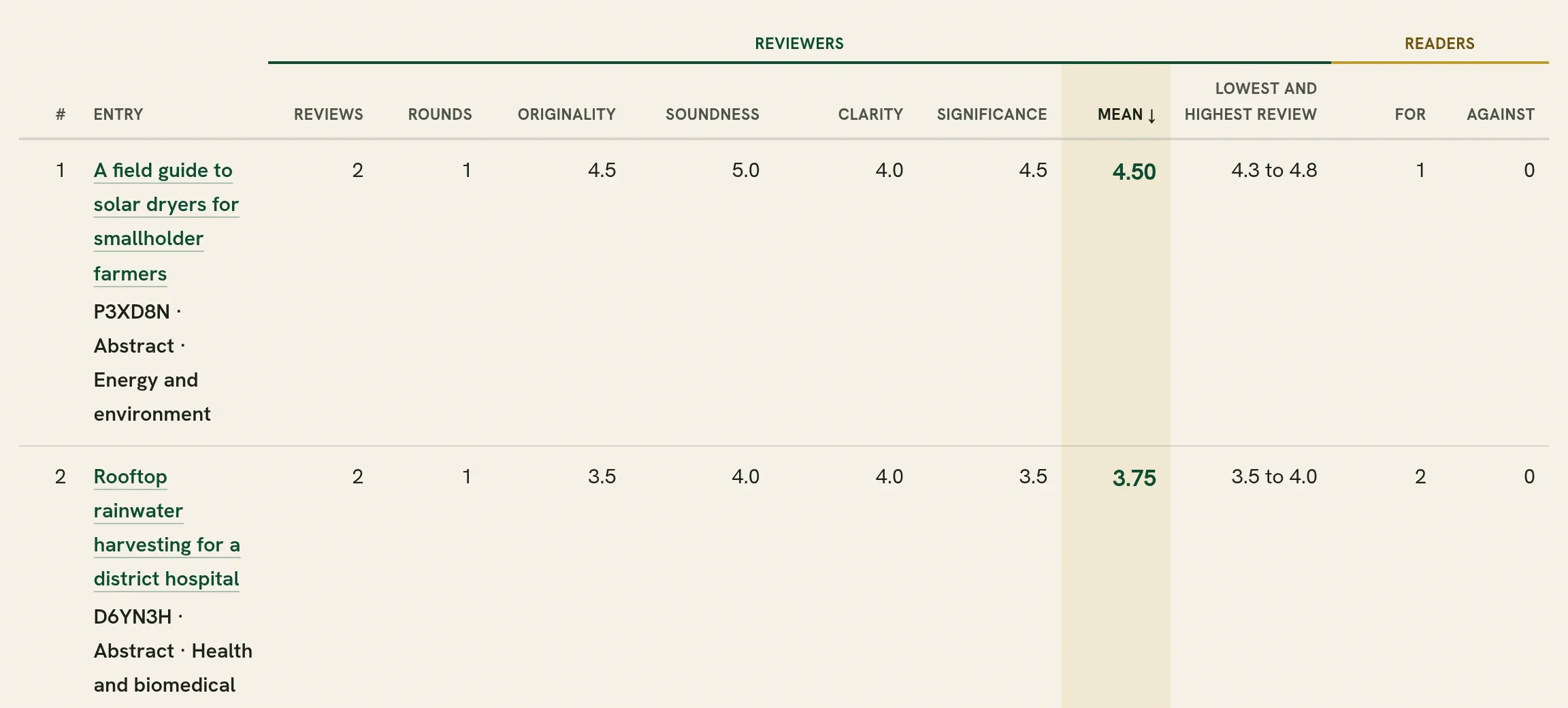
- Press a heading to sort by that column. Press it again to turn the order round. The list starts with the highest mean first.
- Mean is in bold. It is the mean of the entry’s reviews as they were given.
- Rounds is how many rounds of review the entry went through. Reviews counts each reviewer once, on their latest review.
- Lowest and highest review gives the lowest and the highest of the reviews an entry got, for example 2.5 to 5.0. It shows where reviewers disagreed. Sort by it to bring the entries whose reviewers were furthest apart to the top. An entry whose reviews are 1.5 or more apart is marked Reviewers differ by.
- An entry nobody reviewed says None and goes last.
This list is for reading, not for giving awards. A plain mean favours an entry that met a generous reviewer. For an order to give awards by, use Ranking for awards.
Votes from readers
Section titled “Votes from readers”Open Reviewers and readers, then its Readers tab. For an award chosen by the audience, or to see what readers found worth reading. It is off until you turn it on. You see every figure. The public sees only what you choose.
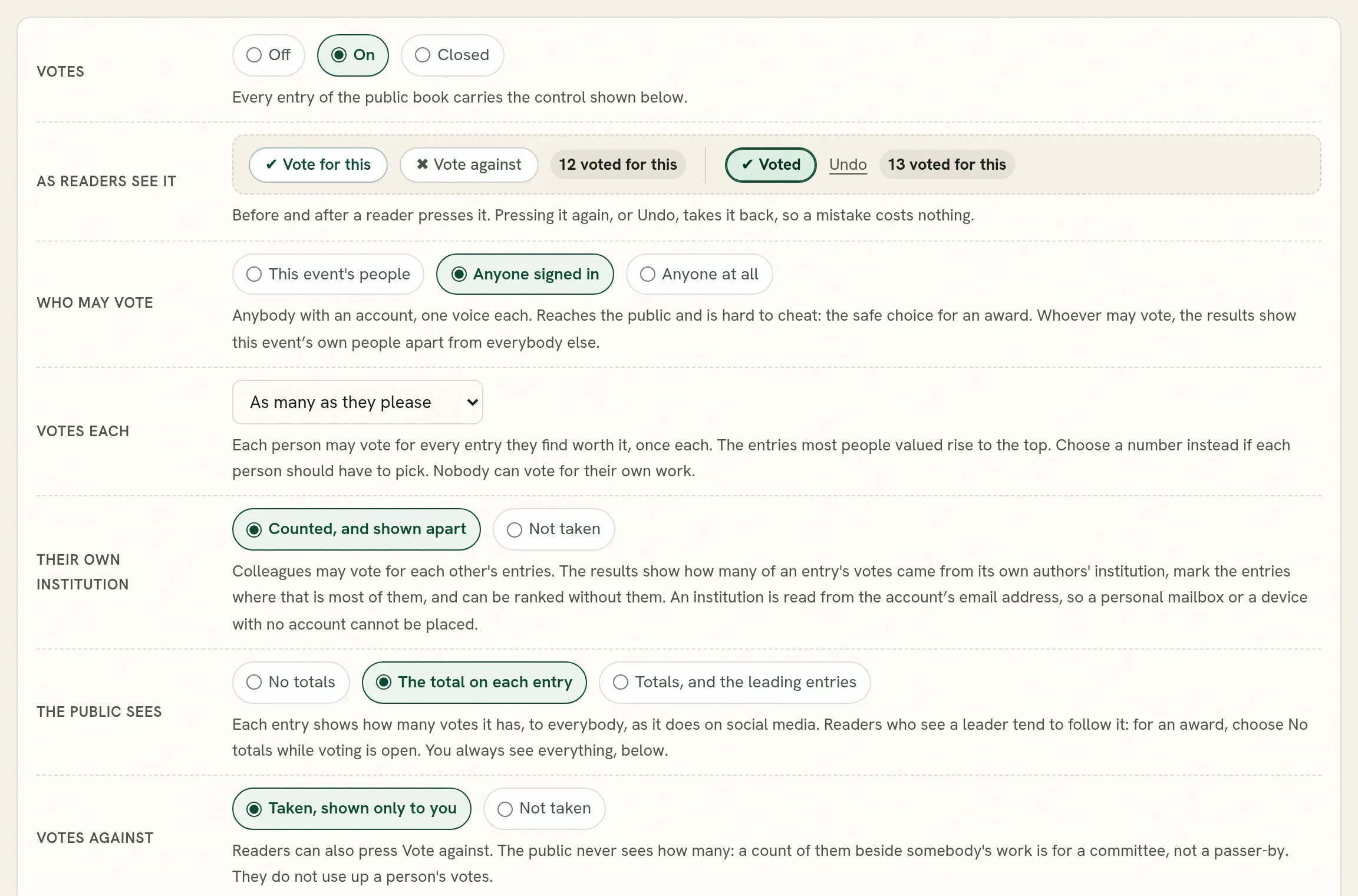
| Setting | Choices |
|---|---|
| Votes | Off: readers see the book and nothing else. On: every entry carries the control. Closed: no more votes are taken, and the controls and totals stay as they are. |
| Who may vote | Anyone signed in; anyone at all; or only this event’s authors and registered participants. |
| Votes each | As many as they please, one to an entry; or one, three, five or ten. |
| What the public sees | Nothing; the totals; or the totals with the leading entries listed at the head of the book. A total is written in words under each entry, such as “12 voted for this” or “No votes yet”. It counts votes for the entry only, so nobody can read it as votes against. |
| Votes against | Taken or not. Only you ever see them. |
| Own institution | Whether a vote for work from the voter’s own institution is counted, or not taken. |
| The word | “Vote” or “like”. |
| Last day | Votes are taken through that day, wherever the reader is. |
Nobody can vote for their own work. Nobody, including you, sees who voted for what.
Read the results
Section titled “Read the results”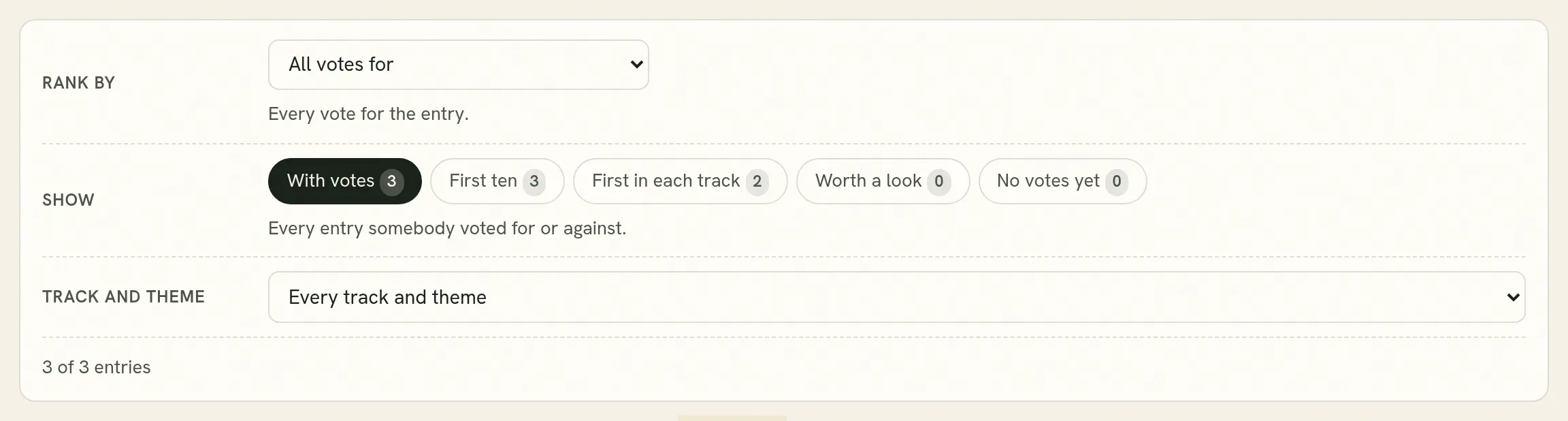
One number hides how an entry came by it. Colleagues from one institution can each vote for each other’s work, and that is a different thing from an audience choosing. So the same votes can be read several ways:
| Rank by | What it tells you |
|---|---|
| All votes for | The plain count. |
| Votes for, less votes against | What is left when the votes against are taken off. |
| Votes from outside its own institution | What the rest of the audience thought. |
| How many institutions voted for it | Breadth of support. |
| Votes from this event’s people | Only authors and registered participants. |
| Most votes against, Most divided | Where readers disagreed. |
Show narrows the list: the first ten, the first in each track, the first of each kind, entries worth a look because most of their votes come from one institution, and entries with no votes yet. Kind and Track let you read a best poster apart from a best paper.
Where the votes themselves show something worth weighing, such as most votes coming from voters who voted for one entry only, a To weigh line says so above the results and leads to Ranking for awards, where the choice for it is.
The results can be downloaded, and Summary report gives the figures as a PDF or a spreadsheet.
When you are ready to announce
Section titled “When you are ready to announce”Choose Closed. The count stops, and the book still shows the controls, saying voting has closed, with whatever totals you chose to show.
Reset the votes removes every vote. It asks you to type a confirmation, and the figures as they stood are kept in the record.
Ranking for awards
Section titled “Ranking for awards”The Ranking for awards tab puts the entries of the book in order for an award: on what their reviewers scored, on what readers voted, or on both. It is there whether or not readers vote, since every entry was reviewed. It orders the entries and says how sure it is. The choice stays yours.
Before you rank
Section titled “Before you rank”Above the choices, Before you rank lists what the reviews and votes of your own book show to be weak evidence. It reports only what it finds, so the list is short where the reviewing was sound. Nothing is changed until you choose.
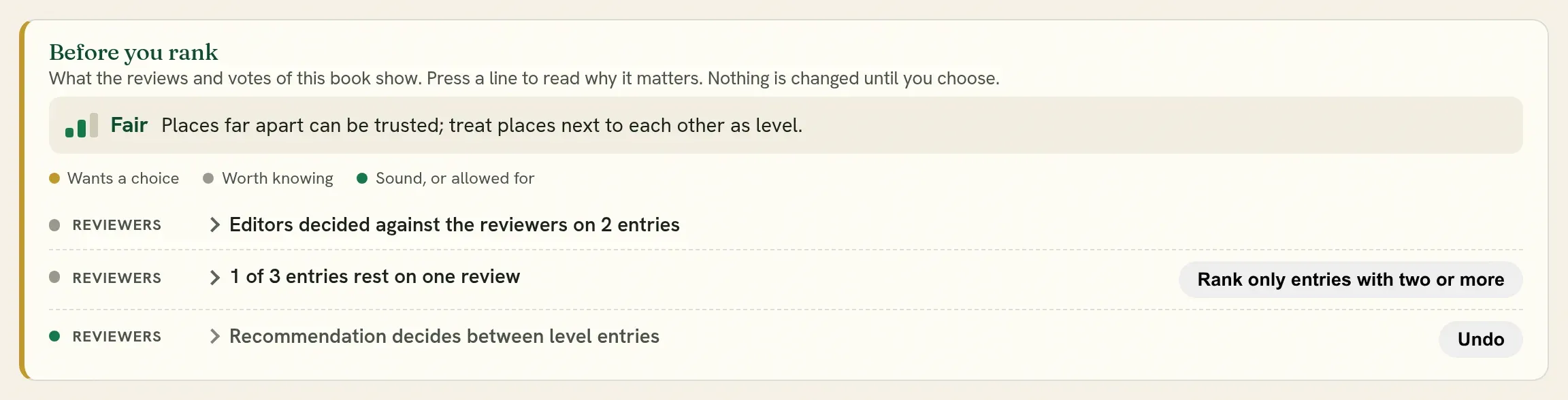
The first line says how far the order can be relied on, in a word:
| It says | What it means |
|---|---|
| A shortlist | The figures cannot put the entries in a firm order: most entries rest on one review, or reviewers of one entry differ as much as entries do, or the votes are few. Read the first few of each kind together before an award. |
| Fair | Places far apart can be trusted. Treat places next to each other as level. |
| Firm | Reviewers mostly agree on which entries are stronger. |
Under it, each finding is a few words with its figure. Press a line to read why it matters. Each line has a mark: gold wants a choice, grey is worth knowing, green was looked for and is sound or already allowed for. Where there is a choice, the button on the line makes it, and Undo takes it back. The sentence under the choices always says what was chosen, and the download carries it.
| It looks for | What it offers |
|---|---|
| Reviewers who score well above or below the others | Even them out, which is on to begin with. It says whether reviewers could be compared on the same entries, or only with the average of all reviews. |
| How the reviewers’ recommendations count | Let it decide between level entries, which is on to begin with, or Undo to leave the recommendation out. Where nearly every review recommends the same, it says the recommendation changes little. |
| A reviewer who gave the same score to everything, on every criterion, over three reviews or more | Leave those reviews out. They do not say which entry is stronger. |
| A review by a reviewer at the same institution as an author of the entry | Leave them out where another review remains. A review that is the only one of its entry is always kept, so no entry is left unranked. Where every such review is the only one of its entry, as when an event is held within one institution, it says so and offers nothing. |
| An entry that rests on a reviewer who marked their own confidence as low | Nothing to switch. It names the entries. A reviewer’s confidence is not counted in any score. |
| An entry where one review stands far from the others | Count it as nearer the others, so that one reviewer does not move the entry several places. The plain mean and the lowest and highest review stay as they were given. |
| A review that scores one way and recommends the other | Nothing to switch. It names the entries, for you to read those reviews. |
| Entries accepted on a revision that no reviewer read | Nothing to switch. Their reviews are of the version before the revision. Where a reviewer had recommended major revision or rejection, it names the entries, for you to read before an award. |
| Entries where the editors decided more severely, or less, than every reviewer of that round recommended | Nothing to switch. It names them. The ranking goes by the reviewers. |
| Entries the editors put forward for an award | Nothing to switch. It names them. |
| Entries that rest on one review | Rank only entries with two or more. Where every entry rests on one review, it says so and offers nothing: the order is then a shortlist, to be read together before an award. |
| How far the scores tell the entries apart, as agreement from 0 to 1 | Nothing to switch. Near 1, the order rests on firm ground. In between, treat places next to each other as level. Near 0, two reviewers of one entry differ as much as two entries do: read the first few together, or bring a committee to them. |
| Votes from an entry’s own institution | Count them for less, which is on to begin with. |
| Votes from voters who voted for one entry and no other | Count them as half. It also names entries that have far more of such voters than is usual in your book. Where nearly every voter voted for one entry, it says that the vote shows how many people each entry brought. |
| Whether entries nearer the front of the book got more votes | Nothing to switch. Readers open what they see first, so part of an early entry’s lead is its place. |
| Votes from devices with no account, where anyone may vote | Count only votes from accounts. |
| An entry whose votes mostly came within ten minutes | Nothing to switch. It names the entries. It may be a talk that went well, or a room asked to vote. |
| Very few votes | Nothing to switch. It says they are too few for an award by themselves. |
Every choice is also a switch under Reviewers or Readers below the list. The ones that leave something out are off to begin with.
What to rank on
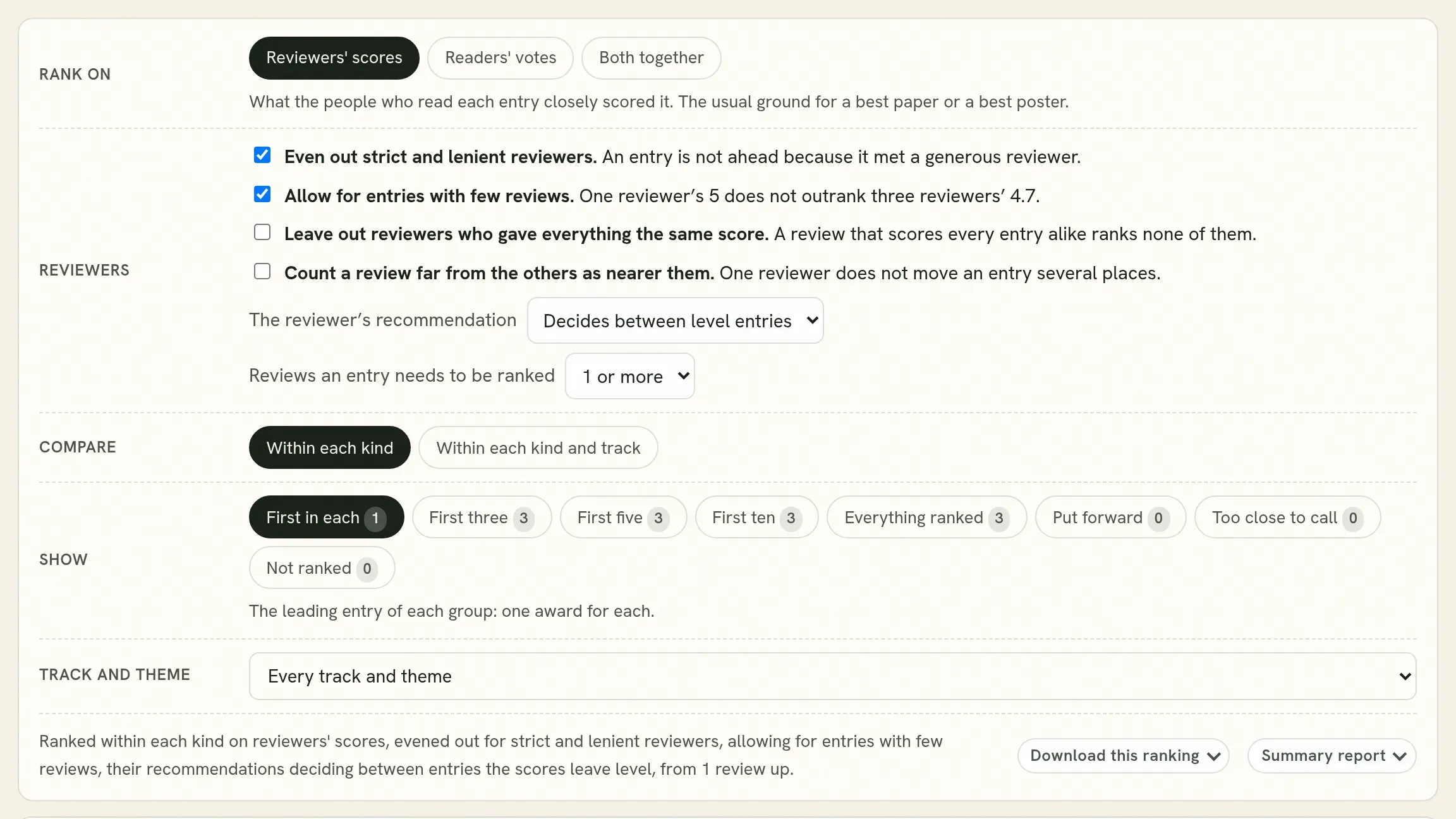
Section titled “What to rank on”| Rank on | Use it for |
|---|---|
| Reviewers’ scores | A best paper or a best poster. The reviewers read every entry they scored. |
| Readers’ votes | A readers’ or people’s choice award. |
| Both together | One award on both. Move the slider to set the share each has; it starts at reviewers 70%, readers 30%. |
A poster is ranked among the posters and a paper among the papers. Within each kind and track ranks each track apart, for an award in each track.
Why it is not a plain average
Section titled “Why it is not a plain average”A plain average of scores, and a plain count of votes, are unfair in ways that decide awards. Each has its correction here. Each is a switch, on to begin with, and the plain figure is always shown beside the corrected one.
| Switch | What it corrects |
|---|---|
| Even out strict and lenient reviewers | Reviewers differ: one gives fours to everything, another rarely goes past three, and each entry meets only two or three of them. A reviewer is compared with the other reviewers of the same entries, and the difference is taken off their scores, in proportion to how many entries they reviewed. An entry is then not ahead because it met a generous reviewer. See Strict and lenient reviewers. |
| The reviewer’s recommendation | A review can score high and recommend rejection, and the scores alone do not show it. To begin with, the recommendation decides between entries the scores leave level. See The recommendation. |
| Allow for entries with few reviews | One reviewer’s 5 is not better evidence than three reviewers’ 4.7. An entry’s score is pulled toward the average of its kind, as though it had one more review at that average. With several reviews this changes little. |
| Reviews an entry needs to be ranked | One to begin with: a reviewer’s score counts whether it is the only one or one of several, and with several their average is used. Raise it to two or three if your committee wants every award to rest on more than one reviewer; an entry with fewer is then listed under Not ranked, with the reason. |
| Votes from the entry’s own institution | Colleagues voting for each other’s work. To begin with they are counted, and for less the more there are: thirty colleagues count as the square root of thirty, between five and six. They are not left out, since colleagues are readers too and voters from elsewhere have leanings of their own. You can leave them out, or count them in full. |
Votes are read as a share, for among all cast, with an allowance for how few they are: three votes for and none against do not outrank thirty for and two against.
Strict and lenient reviewers
Section titled “Strict and lenient reviewers”Reviewers use the scale differently, and an entry should not gain or lose by who it was sent to.
- Where an entry has two reviews or more, each reviewer is compared with the others who read the same entries. They read the same work, so the difference between them is the reviewers and not the entries. This is the firm comparison, and it is one reason to give each entry two reviewers.
- Where an entry has one review, there is nobody to compare its reviewer with, so the reviewer is compared with the average of all reviews. This cannot tell a strict reviewer from one who was sent weaker entries. It is fair where entries were shared out without regard to how good they were, and Before you rank says when this is the comparison in use.
- A reviewer with few reviews is moved little. One who reviewed a single entry may simply have had a good one, so a leaning counts in proportion to the reviews it rests on.
- Recommendations are evened out the same way. A reviewer who seldom says accept is not counted against the entries they read.
The plain mean of every entry is shown beside its score, so you can see what the evening-out changed. Untick the switch to rank on the scores as they were given.
The recommendation
Section titled “The recommendation”Beside the scores, each reviewer recommends accept, minor revision, major revision or reject. The two do not always agree. The reviewer’s recommendation, under Reviewers, sets how it counts.
| Choice | What it does |
|---|---|
| Decides between level entries | The usual choice. An entry moves up or down by how far its recommendations stand from those of its kind, and by no more than half its margin. Two entries the scores separate are never put the other way round. The more reviews an entry has, the narrower its margin, and the less the recommendation moves it. |
| Counts as a fifth criterion | Accept counts as 5, minor revision as 4, major revision as 2 and reject as 1, averaged with the four criteria. A stronger rule: it can move an entry past one the scores put ahead. |
| Not counted | The order rests on the criteria scores alone. |
The choice is shown only where the reviews of your book carry recommendations.
What the editors decided
Section titled “What the editors decided”The editors’ decisions and the number of rounds are shown and counted in nothing.
- Decisions says how the entry came to be accepted: Accepted at once, Accepted after minor revision, Accepted after major revision, with the number of decisions where there were more than two.
- A decision mostly follows the reviewers’ recommendations, so counting it would count the same opinion twice.
- More rounds do not mean weaker work, or stronger. An entry revised twice is judged on what it became.
- Put forward is how the editors say what they think beyond the reviews. Press Put forward on an entry’s row to mark it as one to look at for an award, and Take back to remove the mark. Show: Put forward lists those entries alone, in ranked order. The mark changes no score.
The other choices leave evidence out, so each begins at the setting that leaves nothing out. Change one when Before you rank finds a reason, or when your committee asks for it. Where a choice has three settings they are the same three: Counted in full, Counted as half, Left out.
| Choice | When to use it |
|---|---|
| Leave out reviewers who gave everything the same score | A reviewer scored every criterion of every entry alike, over three reviews or more. Those reviews raise or lower an entry without saying it is better than another. |
| A review from an author’s own institution | A reviewer and an author of the entry have email addresses at the same institution. Count it as half, or leave it out where the entry has another review. Shown where there is such a review. |
| Count a review far from the others as nearer them | An entry with three reviews or more has one that stands far from the rest. That review still counts, and no further than one and a half times the usual disagreement from the middle review. |
| Voters who voted for one entry only | Such a voter may have been asked to vote by an author, or may simply have liked one entry. Count them as half when many votes are of this kind, or leave them out. |
| Votes from devices with no account | Anyone may vote, and some votes came from devices with no account, which one person can repeat. Shown where there are such votes. |
| Votes an entry needs to be ranked | One to begin with. Raise it when the committee wants a readers’ award to rest on more than a handful of votes. |
Two things lessen bias before any vote is cast, and both are set under Votes from readers. Keep the totals hidden from the public while voting is open, since readers who see a leader tend to follow it. And choose who may vote with the award in mind: accounts are harder to repeat than devices.
Read the table
Section titled “Read the table”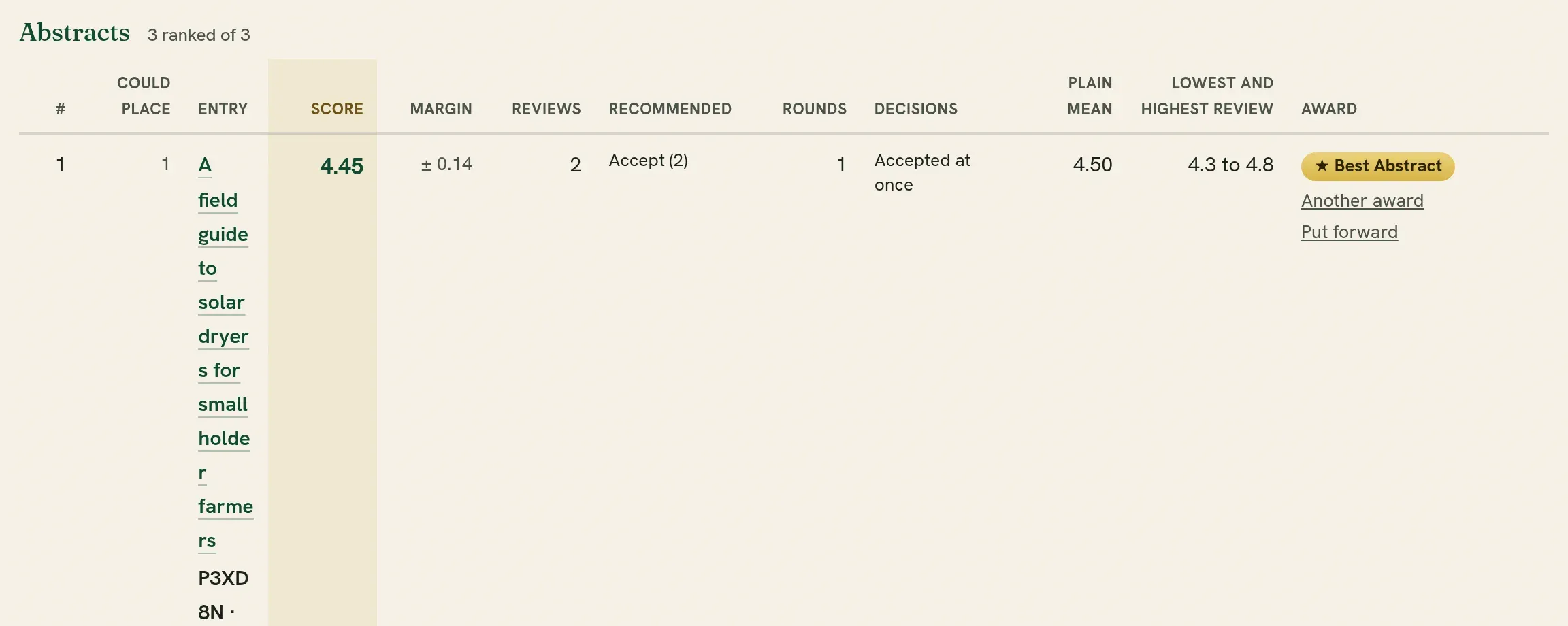
| Column | What it is |
|---|---|
| Could place | The best and the worst place the entry could hold, going by what the figures can tell apart, for example 2 to 5. One number means its place is settled. A wide range means the order around it is not. |
| Score | The reviewers’ score of 5 after the corrections chosen. |
| Margin | How far the score could move with other reviewers, written with ±. It is narrower the more reviews an entry has, and widest for an entry with one. |
| Reviews, Plain mean, Lowest and highest review | How many reviews, their mean as they were given, and the lowest and highest. |
| Recommended | What its reviewers recommended. Point at it to see how far the recommendation moved the entry. |
| Rounds, Decisions | How many rounds of review the entry went through, and what the editors decided on the way to accepting it. For your information: they are counted in nothing. |
| For, Against, Standing | The votes as they are counted, and the entry’s standing with readers as a percentage. A count can have a decimal, since a vote can count as half and votes from one institution count for less. A line under the entry gives the votes as they were cast. |
| Index | Shown for both together. 50 is the average of the kind. |
Every figure has a column of its own, and the columns are the same in every group, so you can read down a column from the first group to the last. The figure the entries are ranked by is tinted and in bold: the score, the standing, or the index.
- Too close to call with the next entry means the figures do not separate the two. Look at both before you decide. Show: Too close to call lists them.
- Its reviewers differ by so many points means the reviewers of that entry disagreed. It is not a fault, and it is worth reading their reviews.
- A line under an entry says when a review or votes were left out by your choices, or a review was counted as nearer the others.
- The reviews counted are each reviewer’s latest review of the entry. No reviewer is named.
Show narrows the list, within each kind: the first in each group, the first three, the first five, the first ten, everything ranked, those the editors put forward, those too close to call, and those not ranked.
- Entries level with the last place shown are shown too, since two entries sharing a place are both in or both out.
- Include more that could place there appears where the figures do not separate some entries from those shown. Tick it to see everybody who could be in the first three, five or ten: where the order is a shortlist, that is the honest list to bring to a committee.
How to pick each award
Section titled “How to pick each award”Set the choices as below, read the first rows, and give the award from the row. Start each one from Back to the usual choices, so a setting left from the last award does not carry over.
| Award | Rank on | Compare | Show | Then |
|---|---|---|---|---|
| Best Paper, Best Poster, Best Abstract | Reviewers’ scores | Within each kind | First in each | One award for each kind, from its first row. |
| Second and third place | Reviewers’ scores | Within each kind | First three | Give each from its row. The title is filled in as second place or third place. |
| Best in each track | Reviewers’ scores | Within each kind and track | First in each | One for each track. The track is filled in under For what. |
| Readers’ Choice, or people’s choice | Readers’ votes, with Votes from the entry’s own institution counted for less | Within each kind | First in each | It says “Chosen by readers’ votes” on the certificate. |
| One award on both, for example a conference prize | Both together | Within each kind | First in each | Agree the share of each in the committee first, then set the slider to it. It starts at reviewers 70%. |
| Best Student Paper, Young Researcher | Reviewers’ scores | Within each kind | Everything ranked | Go down the list to the first entry that qualifies, since the ranking does not know who is a student. Give it from that row and change the title. |
| Best Presentation, Best Innovation, and others judged on the day | Not from the ranking | Give it by hand: on Participants, press Mark an award on the person’s row, and choose Chosen by the organizing committee. |
A few rules that keep the result fair:
- Decide the method before you look at the names. Agree in the committee what each award is ranked on, and the share of each for an award on both, then open the ranking. Changing the switches until a preferred entry comes first is the one thing the ranking cannot protect you from.
- Leave the corrections on unless the committee has a reason to turn one off, and write the reason down.
- A committee member who is an author of an entry steps out while its kind is decided.
- Check that the winner is coming. An award is printed on the certificates of the people on the submission, and they need to be on the participants list.
Giving an award: look, then confirm
Section titled “Giving an award: look, then confirm”An award is never given in one press. From a row of the ranking, press Give an award, which opens a short form and gives nothing yet. Check the title and how it was chosen, then press See the certificate.

- Look at the certificate. You are shown the real certificate, drawn as its holder will download it: the name, the title of the work, the award on its ribbon and the gold seal. Under it you are told whose certificate it is and how many other people on the submission get the same award. Press Go back and change it if the wording is not right.
- Confirm. You are told what giving it does, and asked to tick that you have looked.
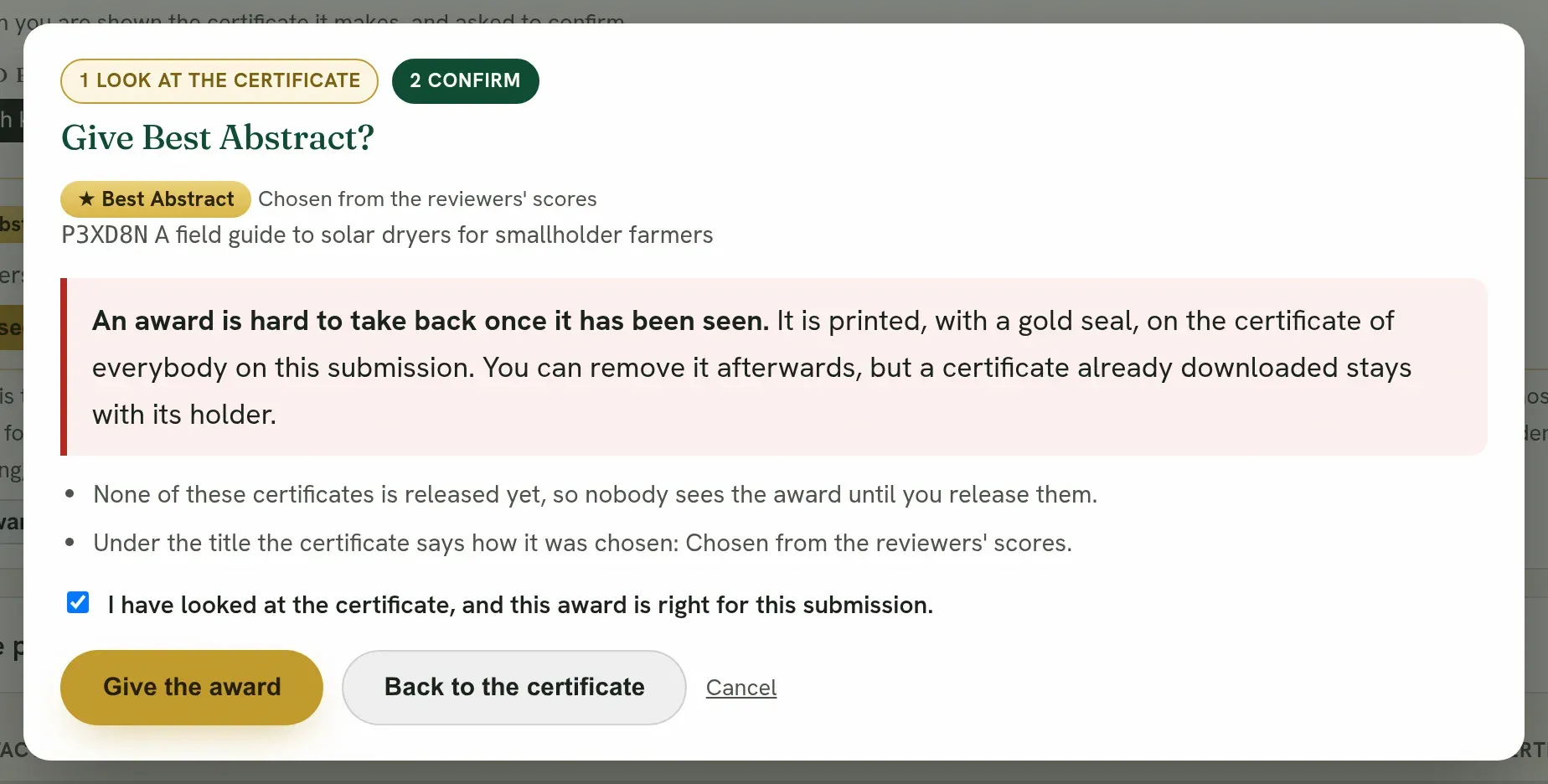
- It is printed on the certificate of everybody on the submission.
- A certificate already released shows the award at once. The confirmation says how many are released.
- You can remove an award later, but a copy already downloaded stays with its holder. That is why it asks first.
- It says when the submission holds an award already. A certificate shows two awards at most.
Nothing is saved until you press Give the award. Closing the window at either step gives nothing.
When the first two are too close to call
Section titled “When the first two are too close to call”The ranking marks the first entry Too close to call with the next entry when the figures do not separate them. It is saying that either could be first, so the figures should not decide alone. The committee can:
- Read the reviews of both and decide. The reviewers’ comments usually say what the scores cannot.
- Look at the other side. If the reviewers do not separate them, see which of the two the readers voted for, or the other way round.
- Give it to both, as joint winners: give the same award from each row.
- Ask for another review of both, when there is time before the event.
Two entries with exactly the same figures share a place, and both are shown as first.
One review, or several
Section titled “One review, or several”An entry is ranked whether it has one review or several. With several, their average is used. With one, that reviewer’s score is the entry’s score, and its margin, the ± beside it, is the widest in the table.
- Allow for entries with few reviews moves an entry with one review part of the way toward the average of its kind. Untick it to take a single review exactly as it was given.
- Reviews an entry needs to be ranked can be raised to two or three, when the committee wants every award to rest on more than one reviewer.
An example
Section titled “An example”Three posters, each scored by two of three reviewers. Reviewer A is generous, and reviewer C is strict.
| Poster | Scores | Plain average |
|---|---|---|
| Solar drying | A gave 4.5, B gave 4.0 | 4.25 |
| Cold storage | C gave 3.5, B gave 4.0 | 3.75 |
| Seed coating | A gave 4.0, C gave 3.0 | 3.50 |
On plain averages Solar drying leads Cold storage by half a point. But reviewer B, who read both, scored them the same. The half point is the difference between reviewer A and reviewer C, not between the posters. With Even out strict and lenient reviewers on, each reviewer’s leaning is taken off, the half point between the two posters becomes a fifth of a point, and the first is marked too close to call. The committee then reads both, which is the right outcome: the scores never separated them.
Give the award
Section titled “Give the award”On a row, press Give an award. The title and how it was chosen are filled in from the ranking, for example Best Poster, second place, chosen from the reviewers’ scores, and you can change both. The award is printed on the certificate of everybody on that submission. See Awards.
Take it away
Section titled “Take it away”- Keep a record. For each award, download the ranking with the choices set as the committee agreed them, and file it with the minutes. It shows the order, what each place rests on and the choices made, so the decision can be explained later.
- How this ranking is worked out, step by step, folded under the choices, shows the arithmetic behind the order on screen: each step with its formula and what the letters stand for. It shows only the steps your choices switch on, and changes as you change them. Open it when the committee asks exactly what was done to the scores.
- Download this ranking gives the order on screen as a spreadsheet or CSV, with what each place rests on. The spreadsheet has a second sheet with the choices you made and how each figure is worked out, to keep with the committee’s minutes.
- Summary report gives the votes, the reviewers’ scores, the first three of each kind, the entries too close to call and the awards given, as a PDF or a spreadsheet.
Quorum PressOpen callsRead researchSomething missing or wrong here? Tell us