
DOIs
A DOI is a permanent identifier for a published work. It looks like 10.1234/7k2m-9xqp, and https://doi.org/10.1234/7k2m-9xqp leads to the work for as long as the DOI is looked after.
Who registers a DOI
Section titled “Who registers a DOI”Your organization does, under its own name. The first part of a DOI, the prefix, belongs to the organization that joined a registration agency. Most universities, societies and journals use Crossref. The organization is named as the publisher, and the DOIs stay with it whatever system it uses.
Quorum Press does its part around that:
| Your organization | Quorum Press |
|---|---|
| Joins the agency and holds the prefix | Guides you through joining, if you have not |
| Chooses and registers each DOI | Prepares the list to register from |
| Is named as the publisher | Gives each manuscript a permanent page for the DOI to point to, or uses the addresses on your own website |
| Keeps the pages open, where they are on its own website | Notices when a DOI is registered, by asking the DOI resolver |
| Shows each DOI on its manuscript, and in the details search engines read |
If you have no prefix yet
Section titled “If you have no prefix yet”- Find out whether your institution is already a member. Many are: ask the library or the research office. One membership covers every journal and conference of the institution.
- If it is not, apply to the agency. Crossref charges a yearly fee and a small fee for each DOI, and removes both for organizations in many countries.
- Name an office that will keep the login and do the registering, and not one person’s own email address.
Apply for your own DOIs goes through Crossref’s form question by question: what to prepare, which option to choose, who suits each of the five contacts, what happens after you apply, and what an institution that was a member before should do first.
Ask us at any step. We guide institutions through joining and through their first registration.
Two ways to register
Section titled “Two ways to register”Open your conference or journal and press Publishing & DOIs. Choose whichever suits you.
- Have them prepared for you. Quorum Press chooses a DOI for each ready manuscript under your prefix and writes the file Crossref takes. You upload one file. This is the quicker way, and nothing is typed by hand.
- Choose and register them yourselves. You download a list, register each DOI in your agency’s own tools, and record the DOIs here.
Either way your organization is the one that registers, and a DOI is shown on a manuscript only after it is registered.
What Quorum Press never asks for
Section titled “What Quorum Press never asks for”Your Crossref login stays with you. Quorum Press does not ask for it, does not store it and never signs in to Crossref in your name. It prepares the file; a person at your organization uploads it. This is on purpose:
- Nobody outside your organization can register, change or redirect a DOI under your prefix.
- Nothing is registered until you have looked at the file and chosen to upload it.
- If you stop using Quorum Press, there is nothing to hand back or switch off. Your prefix, your DOIs and your login were never anywhere else.
Quorum Press learns that a DOI is registered the way anybody can: by asking the public DOI resolver whether it opens.
What gets a DOI
Section titled “What gets a DOI”Choose this before any DOI is prepared. On Publishing and DOIs, under DOIs, What gets a DOI offers the usual choices:
| Choice | What it gives | How a work is cited |
|---|---|---|
| Each work, and the book as a whole | A DOI for each full paper and each abstract, and one for the book of abstracts | By its own DOI |
| The book as a whole only | One DOI, for the book | By the book’s DOI and its page |
| Full papers, and the book as a whole | A DOI for each full paper, and one for the book | A full paper by its own DOI, an abstract by the book’s and its page |
| Full papers only | A DOI for each full paper | A full paper by its own DOI; abstracts are in the book without one |
Under Or choose each, tick Full papers, Abstracts, Posters and The book of abstracts as a whole for a mix of your own. Posters are left out unless you tick them: a poster is rarely cited by itself.
Choose with care. A DOI cannot be taken back once it is registered, so a choice can be widened later but not narrowed.
How a work in the book is cited
Section titled “How a work in the book is cited”Where only the book has a DOI, a work in it is cited by the book and its page, for example: Otieno, A. (2026). Rain on the plateau. In: Book of Abstracts of the Water Conference 2026, p. 23. https://doi.org/10.12345/abcd1234.
The book as a whole
Section titled “The book as a whole”Under The book as a whole, give the book’s title as it should be registered, and its ISBN if it has one. An ISBN is not needed for a DOI. Given, it goes in the file for Crossref and at the top of each page of the event’s papers. The line above the fields says where the book’s DOI stands.
Have them prepared for you
Section titled “Have them prepared for you”-
Say whose DOIs these are. Enter your DOI prefix (the part before the slash, such as
10.12345), your organization’s name as it is registered with Crossref, and the person or office that registers, with an email address. Press Save. The page tells you the name Crossref holds for that prefix, so a mistyped prefix is caught at once. These details are kept for your organization and used for all its conferences and journals. Under How each DOI ends, choose one of four ways; each follows Crossref’s rules:- The work’s tracking code (recommended):
10.12345/kg23r7. The code authors and readers already see on the paper, the programme and the certificate becomes its DOI, so one identifier serves for everything. The code is random and says nothing about the work, as Crossref asks. The book of abstracts, which has no code, is given a code of its own, six characters like a work’s, kept so that no work is ever given the same code. A work published in a second place gets its code with.2(see A work published in two places). If a DOI with the ending wanted already exists, random letters are used instead, so no existing DOI is ever overwritten. - Random letters:
10.12345/vd8ek1jf, what Crossref suggests first. - Random letters in two groups:
10.12345/vd8e-k1jf, easier to read out and copy. - A short name, then the tracking code:
10.12345/uni.kg23r7, with a short name you choose. Many publishers do this, but Crossref advises against names in a DOI: if the name changes, the DOI cannot.
The choice applies to DOIs prepared from then on. DOIs are always written in lower case, which Crossref finds easier to read; a DOI typed in capitals still opens.
- The work’s tracking code (recommended):
-
Say where the DOIs point. Choose Its page on Quorum Press, which needs nothing more, or A page on our own website if your organization keeps its published work itself. For your own website, give the address of each manuscript with
{code}where the manuscript’s tracking code goes, such ashttps://www.example.edu/proceedings/2026/{code}/, and the address of the whole volume. The page shows what one manuscript’s address comes to. Press Save where they point. -
Press See what would get a DOI. A list shows every work your choice gives a DOI to now, ticked, with what it is registered as and the address its DOI will open. Untick any you want to leave for later. A line below lists the works not given one now, each with why: already prepared, not public yet, its fee not settled, or a kind you chose not to give DOIs to. Then press Prepare. You see the DOIs in the list on the page, marked Prepared, not yet registered. Nobody else sees them.
-
Make sure every page is there first. Crossref registers the address it is given and does not look at it. A DOI that opens a missing page is broken for everybody who cites it, and Crossref’s members undertake to keep a page at every DOI they register. Where the DOIs point to Quorum Press the pages are there once the work is public. Where they point to your own website, have the pages put up first (the folder under For your own website has them), then press Check the pages are there: each address is opened as a reader would, and any that do not open are listed. A site that refuses checks is said to be refusing, not missing: open those yourself. A site whose security certificate is incomplete is named too: its pages open in a browser, but Crossref’s link checker and indexers may refuse them, so ask whoever runs the site to install the full certificate chain.
-
Press Download the file for Crossref and upload it in Crossref’s admin tool, doi.crossref.org: sign in, choose Submissions, then Upload, pick the file, choose the type Metadata and press Upload. Upload it once.
- “SUCCESS: Your batch submission was successfully received” means only that the file arrived. It then waits in Crossref’s queue with other publishers’ files; Show submission Queue shows how far it has got.
- When it is done, Crossref emails a submission log to the address in the file: how many records succeeded and how many failed, and why. Keep it. Every record should have succeeded.
- If a record failed, put it right at its source here (a missing author name, for instance), download the file again and upload it again. Records that succeeded are not harmed by being sent again.
- Where your works also go to a journal with a file of its own, upload the event’s file first (see A work published in two places).
-
Wait for them to open, or press Check which are registered. A DOI is registered when it opens. Quorum Press asks the DOI resolver about each prepared one every few hours and puts each on its manuscript once it works; the button asks at once. A DOI that does not open yet stays hidden. If one opens a different address from the one in the file, the page says so.
If Crossref has confirmed them and the check does not see them yet, Crossref has registered them puts them on their manuscripts on your word.
If DOIs were prepared by mistake and the file was never uploaded, Discard the prepared DOIs removes them.
Correcting a work after its DOI is registered
Section titled “Correcting a work after its DOI is registered”A correction made on Quorum Press after a DOI is registered, such as an author who was left out or a title put right, shows on Quorum Press at once. Crossref still holds the record it was sent. Crossref’s members undertake to keep their records up to date, so send it the corrected records: press Download the records again for Crossref (and Again, for each journal with its own file) and upload the file as before. Crossref replaces each record by its DOI. The DOIs and where they lead stay the same, and the records that did not change are sent again unchanged. If your works are on your own website, make the folder again too, so their pages say the same.
Before anything is prepared
Section titled “Before anything is prepared”The list shown by See what would get a DOI is worked out the same way as preparing, so what you see is what is prepared. A work is ready when its page is public on Quorum Press and, where your call charges one, its registration fee is settled. This holds even where its DOI will point to your own website: the page here is where readers land while your site is being set up. The book of abstracts as a whole can be given its DOI by itself, once the book is released, at any time.
The file holds, for each manuscript: its title, its authors in order with their affiliations and ORCID iDs, its abstract, its date, its DOI and the address the DOI points to. An abstract or a poster is registered as an abstract; a full paper as a full paper. A journal needs its ISSN recorded first.
Choose and register them yourselves
Section titled “Choose and register them yourselves”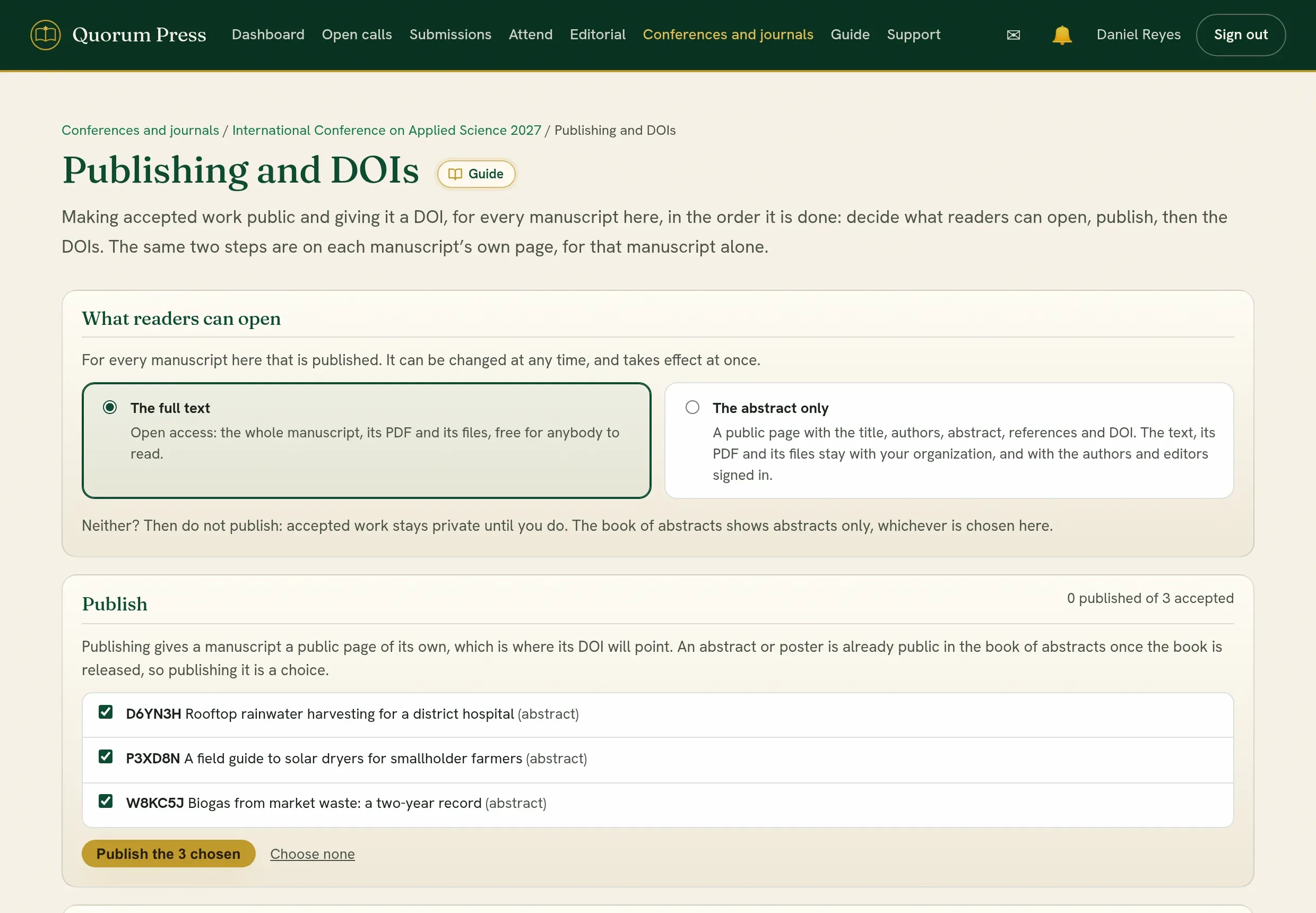
- Download the list. One row for each accepted manuscript: its tracking code, title, authors in order with their ORCID iDs and affiliations, the date it was published, and the address the DOI points to. A column says whether the manuscript is ready.
- Register with your agency. Give each ready manuscript a DOI under your prefix and register it with the address from the list, using the agency’s online form or a file for many at once.
- Record the DOIs here. On the same page, paste a line for each manuscript, its tracking code and then its DOI, copied straight from your spreadsheet. Each DOI then shows on its manuscript.
The same can be done for one manuscript from its own page: under Publication and DOI, Prepare a DOI for this manuscript prepares one for that manuscript alone, and Or enter a DOI registered elsewhere records one you already have.
Rules worth keeping
Section titled “Rules worth keeping”- Register only manuscripts marked ready. A ready manuscript has an address that already opens for everybody: its own page once it is published, or its entry in the book of abstracts once the book is released. A DOI must never point to a page that does not open.
- A registration fee not yet settled. Where your call charges a fee and holds things back until it is paid, manuscripts whose fee is not settled are marked in the list and are not recorded unless you tick the box to include them. A manuscript with a DOI is part of the published record and stays in the book, the programme, badges and certificates whatever later happens to the fee. Publishing a manuscript asks you to confirm for the same reason.
- Register first, print second. Put a DOI in a book, a certificate or a letter only after the agency has accepted it.
Where a work’s DOI shows
Section titled “Where a work’s DOI shows”Once a work’s DOI is registered, whether the agency accepted it after you prepared it here or you recorded it yourself, it is printed under the work’s abstract in the book of abstracts, as a link in the form https://doi.org/..., the way the agencies ask a DOI to be shown. That is on the book’s page, in its PDF, its Word copy and its LaTeX files, and in the book in the folder for your own website. A DOI that is only prepared, and not yet registered, is shown nowhere but to you.
- Keep the part after the prefix meaningless. Letters and digits, and nothing that could later be wrong: no year, no page number, no volume. A tracking code is fine: it is random and never changes. A DOI can never be changed or deleted.
- One DOI for one work in one place. An abstract that later becomes a full paper of the same event keeps its one DOI; the record is brought up to date with the full paper, which costs nothing. A work published in a second place, a journal, has a second DOI, linked to the first (below).
A work published in two places
Section titled “A work published in two places”Some events publish every accepted work’s abstract in the book of abstracts and send some full papers on to a journal. The abstract in the book and the article in the journal are two publications, cited differently, so Crossref asks for a DOI for each, linked as versions of one work:
| Its DOI | |
|---|---|
| The abstract in the book (registered with the book) | the work’s code, 10.12345/kg23r7 |
| The full paper in the journal (registered when the journal publishes it) | the code with .2, 10.12345/kg23r7.2 |
| A full paper that stays in the event’s proceedings | the code alone: one DOI, its record updated when the full paper is added |
The first DOI a work gets keeps the plain code, since a registered DOI never changes; a later one adds .2. The number says only that it is the work’s second DOI, which stays true wherever the work goes, where a journal’s name in a DOI could come to be wrong.
The abstract’s DOI opens its entry on the event’s pages, and the journal’s opens the article on the journal’s. The book shows the abstract’s DOI under its entry; the article’s page and PDF show the journal’s, and say where an earlier version was presented, with its abstract’s DOI. The journal’s file for Crossref names the abstract as an earlier version (Crossref’s isVersionOf), which Crossref accepts only once the abstract’s DOI is registered: so upload the event’s file first, and once its DOIs open, download the journal’s file again before you upload it. The page says so when that is waiting.
A journal can end its DOIs its own way: under Where each work is published, open How its DOIs end under its name and choose random letters, or a short name before the code (10.12345/journal.kg23r7).
Where each work is published
Section titled “Where each work is published”Every accepted work is published by the event it was sent to, unless you say otherwise. Sometimes a journal takes some of a conference’s full papers, or you make a volume of chosen papers. On Publishing and DOIs, under Where each work is published:
- Press Add a journal or a volume. Names are suggested: your organization’s own journals on Quorum Press, with their ISSN, names you used at your other events, and the usual names for an event’s own volumes. Press one to fill the form, or type the name as it should be printed. Volume, issue, year and ISSN can be left empty until they are known.
- Tick the works it takes. You can find them by code or title, show one theme, or show the works by what was accepted. That list separates, for example, Full paper accepted from Abstract accepted, full paper not yet: an accepted abstract whose authors have sent a full paper that is still being reviewed. Each row says the same under Accepted as, so you can place the works whose full paper is accepted and leave the others until theirs is.
- Choose the name beside Publish them in. See it as it would be opens the first ticked work with that name at its head, before anything is saved.
- Press Place them.
The name then stands at the head of each of those works, in its PDF and on its public page, with a line saying which event it was presented at. It is also the name in how the work is cited, in the list for registering DOIs, and in the details that indexes such as Google Scholar read. A full paper placed in a journal is called a research article.
Preview on each row opens that work’s PDF. Remove takes a name off the list, and its works are published by the event again.
For Crossref, the works placed in a journal are registered as that journal’s articles. After Prepare DOIs, a button The file for with the journal’s name gives a file of its own; the event’s file holds everything else.
Where a DOI points
Section titled “Where a DOI points”You choose where each DOI points.
- Its page on Quorum Press. The page is under the name of your conference or journal and stays where it is, including when a manuscript is corrected or retracted, so the DOI keeps working. Nothing to set up.
- A page on your own website. Your organization puts up a page for each manuscript and for the volume, and keeps them open. The file for Crossref and the list carry your addresses. The DOIs are yours and go on working whatever you use to run your next call. Each page should show the title and authors, the DOI, and a way to the full text.
A link for a journal’s name
Section titled “A link for a journal’s name”Give a journal or volume its website, when adding it or later under A link for its name, and its name is a link to that website wherever it is shown: on the paper’s page, on the pages of the folder for your website, and under its entry in the book of abstracts where the book says where each full paper is published. With no website given, the name is shown without a link.
A journal on its own website
Section titled “A journal on its own website”Where some of your papers are published in a journal that keeps its own website, its DOIs can point there and the rest point to the event’s site. Under Where each work is published, open Its own website under the journal’s name and give the address of each work’s page, with {code} where the work’s code goes, and the address of the issue as a whole. The journal’s papers then point there, they go in the journal’s own file for Crossref, and For your own website offers a folder for the journal’s site of its own. The event’s folder keeps each of them as its abstract, as the book does, leading to the full paper on the journal’s site.
The folder for your own website
Section titled “The folder for your own website”On Publishing & DOIs, under For your own website, Make the folder next to The folder for your website makes your published work as a zip to put on your own site. It is made in the background: you can leave the page, and you get an alert when it is ready. Then Download the folder. The folder is kept, so you can download it again later without making it again.
| In the folder | What it is |
|---|---|
index.html |
The volume: its title and every public manuscript, by track |
| A folder for each manuscript, named by its tracking code | Its page (title, authors, abstract, how to cite, its DOI once registered), its full text as a PDF where readers may open it, or for an abstract or poster the abstract as a PDF, and its citation for BibTeX and for reference managers |
book-of-abstracts.pdf |
The whole book as one file, where it is released |
items.csv and items.json |
Every manuscript in one sheet, and the same as data for a website system to import |
style.css |
How the pages look |
README.txt |
How to put it up, step by step |
Where readers on Quorum Press see abstracts only, With the full texts of published papers makes the folder with each published paper’s full text as a PDF, for your own site.
When something changes later, such as a work added after a late payment or a page corrected, press Make it again. Beside Download the folder you then also get Only what changed since the folder before: a small zip of the new and changed files, in their folders, with a note, CHANGES.txt, listing them and any file to take off your site. Put those files over the folder on your website. The PDFs of works that did not change are not made again, so the folder is quicker the second time, and they are not counted as changed. The addresses the DOIs point to never change from one folder to the next.
On Quorum Press, link each work to its page on our website, under the download buttons, makes each work’s page here, and its entry in the online book, say it is published on your website, with a link to its page there. It is off until you choose it, so nothing points to your site before your pages are meant to be found. A link is shown only for a page seen to open: the pages are checked when you turn it on, when you press Check our pages now, and every day. A page that fails two checks in a row loses its link until it opens again; a site that refuses checks keeps what was last seen. The address is where the folder is put, as set under Where the DOIs point (or a journal’s own website), so it works with DOIs or without them. A work whose DOI is registered and leads to your site says so in any case, with the address the DOI opens; that comes first where both are known.
A PDF of each abstract and poster too, under how the pages look, gives every abstract and poster in the book a file of its own, beside its page: its entry exactly as the book of abstracts prints it, headed Book of Abstracts with the event’s name, place and dates, its DOI once registered, and a line saying how to cite it. Authors can keep it, print it and show it. It is on unless you turn it off. An abstract whose work went on to be a full paper keeps the file of the abstract that was accepted: it never looks like a journal article or a paper, and it is cited as an abstract in the event’s book. Search engines are not told that the file is a full text. Making the files takes about a second for every four abstracts; Pages only, without the PDFs is quicker.
How the pages look, under the download buttons, sets the pages to match your website: the main colour (links, headings and buttons), the text colour, the typeface, justified or left-aligned text, the size, and whether the foot says the work is also on Quorum Press. Justified text is the usual. See a page opens one manuscript’s page as it will look. A typeface that is not on every computer goes in the folder, under fonts/, so the pages still call nothing outside themselves. The logo is the one on your certificates, or your organization’s.
The bar at the top of every page carries your name on the left and your links on the right. Tick A small logo to the left of your name to put your logo beside it. Your name leads to the address you give for it; left empty, to your first link, or else to the home of the website the pages are uploaded to. Add up to three links to your own pages in your own words: “All proceedings”, “Past issues” or “Conference home”, for example, with addresses such as https://www.example.edu/proceedings/. Readers who arrive from a DOI or a search can then reach the rest of your website even while its own menu does not list these pages. A journal’s own folder has one link on the right of its bar, “Journal” (or “Proceedings” or “Volume”, by what it is), leading to the journal’s website or else the home of the site its pages are on; change the words or the address under Published in, in the journal’s details. Every volume of two or more works has a search box above its list.
A full paper published in a journal with its own website stays in the event’s folder as its abstract, as it is in the book of abstracts. In the folder its entry says Full paper to appear in the journal until its DOI is registered, and Full paper published in it after, with the DOI, and leads to the full paper on the journal’s site. Its PDF, where the abstracts have theirs, is the abstract, and it tells search engines that the journal’s page is the one that counts, so the work is one record and its citations are counted once. The journal’s own folder says on each page that an earlier version was presented at the event, with a link to the event’s volume. Upload both folders.
On each manuscript’s page, BibTeX and RIS open in place to show the citation, with Copy beside it and the file to download for a reference manager. Copy under How to cite copies the sentence. A volume of more than a few works has a box to find a title, an author or a word.
The pages are plain files. They need no software to run, call nothing outside themselves, and carry the details that Google Scholar and reference managers read. Only what is already public is included.
Upload the folder to your website and keep the folder names. The folder’s address followed by {code}/ is the address to give under Where the DOIs point. After the DOIs are registered, make the folder again and put Only what changed over the first: the pages then show their DOIs.
Pages only, without the PDFs makes the same folder without the PDF files, which is quicker.
Either way the manuscript can be read on Quorum Press as well, with its DOI shown. The address behind a DOI can be changed at the agency later, at no cost, so the choice is not final.
Whichever you choose, a DOI must lead to a page that opens. Where the pages are on your own website, keeping them open is your organization’s part.
When the choice of what gets a DOI changes
Section titled “When the choice of what gets a DOI changes”DOIs prepared before you changed What gets a DOI, for works the new choice leaves out, are named under Take the file to Crossref. They are left out of the file. While they are not registered nobody outside knows them, so Take them back discards them and the rest stay prepared.
For a conference
Section titled “For a conference”A conference usually registers a DOI for each manuscript and one for the book of abstracts or the proceedings as a whole, but the choice is yours: see What gets a DOI. An ISBN for the book is recorded under The book as a whole on Publishing and DOIs; it is not needed for a DOI. See Publish.
Quorum PressOpen callsRead researchSomething missing or wrong here? Tell us