
Decide
When the reviews are in, the board shows the submission as All reviews in, ready to decide.
Read the reviews
Section titled “Read the reviews”Open the submission. History and decision shows each round in order: when it was submitted, each review with its scores and comments, and what was decided.
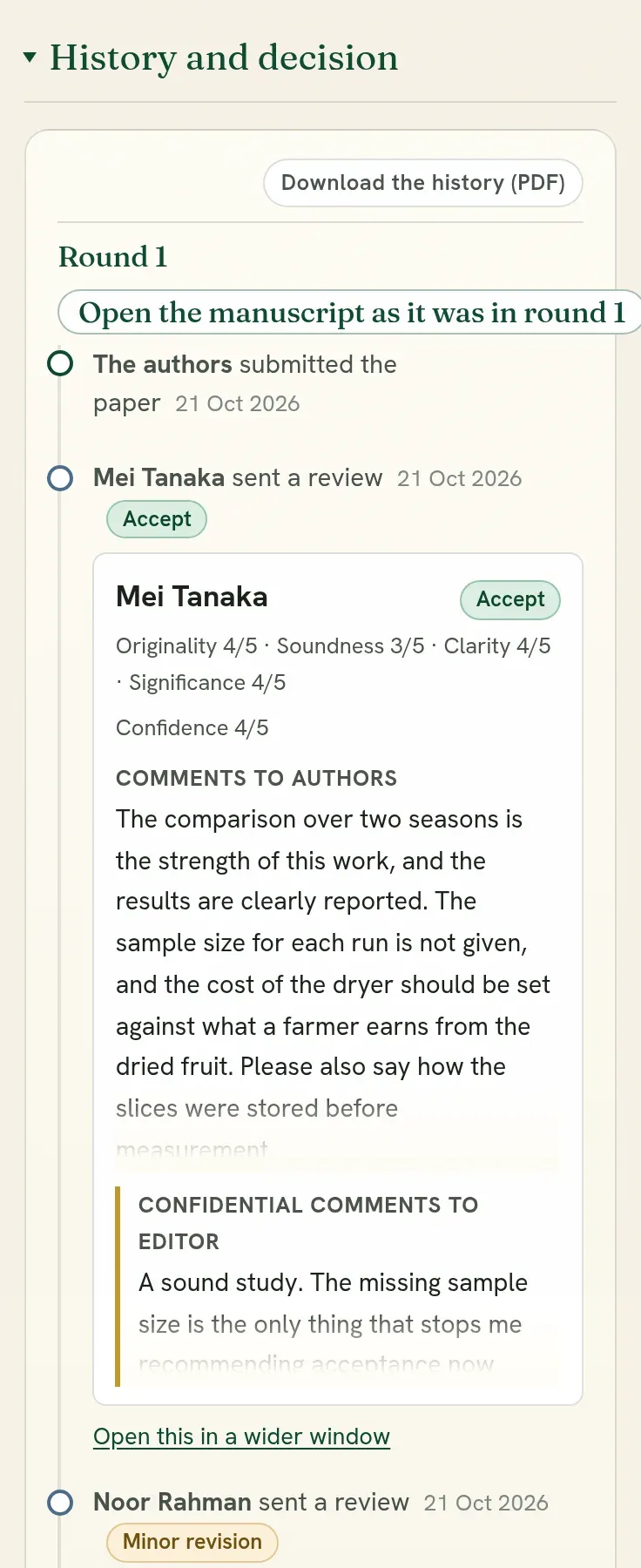
Read every review side by side opens them in a wide window, with the decision form in the same window. You weigh them and decide in one place.
For each review you see:
- the scores and the reviewer’s confidence;
- the comments to the authors;
- the confidential comments to you, which the authors never see;
- the recommendation.
Record the decision
Section titled “Record the decision”-
Choose the outcome.
Decision What happens Accept The authors are told, and asked to confirm their details. Their letter of acceptance is made for them, with your logo and signatures: nobody writes or sends letters one by one. Minor revision / Major revision The submission opens for the authors to change. Their revision comes back as the next round. Reject The authors are told. The reviews are shown to them with your letter. -
Write the letter to the authors. Say what was decided and why. For a revision, say which points must be met.
-
Record it. The authors are told by email and by an alert, and the reviews of that round are released to them with your decision.
Writing a good decision letter
Section titled “Writing a good decision letter”- Say the decision in the first sentence.
- Give your own reasons, not only “see the reviews”.
- For a revision, list what is required and what is only advised. If reviewers disagree, say whose point the authors should follow.
- Give a date for the revision.
- Be courteous, most of all when rejecting.
If you recorded the wrong decision
Section titled “If you recorded the wrong decision”A decision recorded in error can be taken back: the wrong choice pressed, or the right choice on the wrong submission.
Open the submission. Under History and decision, below the rounds, press Take this decision back. Say why in a sentence, tick the box, and confirm.
| What | What happens |
|---|---|
| The round | Open again, as if it had not been decided. The decision form returns, and you record the right decision. |
| The authors | Told that the decision was recorded in error and no longer stands, with your reason, and that a new one will follow. Their page says the same. |
| The reviews of that round | Yours alone again until you decide. Authors see reviews only with a decision. |
| Reviewers | One who had not finished is told the review can still be sent. One who had is told nothing is needed. |
| A revision in progress | If you had asked for a revision, the authors can no longer send it. What they wrote so far is kept, and is given back to them if you ask for a revision again. |
| The record | What was recorded, by whom and when, and why it was taken back, stays in the history of the submission. |
It is for a mistake caught soon. It is not offered once something rests on the decision:
- the submission is published, or its publication was asked for;
- the authors have sent the revision you asked for. Record a decision on the revision;
- proofs were sent, corrections are open, an award was given, the submission has a place in the programme, or somebody on it has attended. Undo that first, where it can be undone;
- the decision was on a full paper written from an accepted abstract. Contact support.
The authors already have the letter of the decision you take back. Take a decision back only when it was wrong, and record the right one soon after.
Where an acceptance can no longer be taken back, the page says why under History and decision, and points to Withdraw the acceptance.
Withdraw an acceptance
Section titled “Withdraw an acceptance”Sometimes an acceptance has to end with nobody having made a mistake when it was given: the work turns out to have been published elsewhere, its authors cannot be reached, or a condition of the acceptance was not met. By then the work may have a place in the programme and its authors may have registered, so the decision cannot simply be taken back.
Open the submission. Under If something is wrong, press Withdraw the acceptance and say why in a sentence.
| What | What happens |
|---|---|
| The submission | It is no longer accepted. It is recorded as an acceptance withdrawn by the editors, never as a rejection and never as the authors’ own withdrawal. |
| The programme | Its place is taken away. Others in its session keep theirs. |
| The book of abstracts | It is no longer in the book, or in any list of accepted works. |
| The authors | Every author is told, in the app and by email, with your reason. Their page says the same. |
| Registration and payments | They stay as recorded. Whether anything is returned is for you to settle with the authors. |
Restore the acceptance, in the same place, puts the submission back where it stood and tells the authors. Its place in the programme is not brought back by itself: place it again on the Program page.
It is not offered for a published submission. Retract that instead; see Publish. An award has to be taken away first, and open corrections closed.
| You want to | Use |
|---|---|
| Undo a decision recorded in error, the same day | Take this decision back |
| End an acceptance after the event was planned around it | Withdraw the acceptance |
| Pause a submission while something is settled | Put it on hold |
| Keep an accepted abstract out of the printed book only | Leave a work out of the book, on the book’s page |
| Mark published work as no longer standing | Retract it |
You decide, not the reviewers
Section titled “You decide, not the reviewers”Reviews advise. You may decide against a recommendation, with reasons. Weigh a review by the reviewer’s confidence and by how well it argues, not by its score alone.
After a revision
Section titled “After a revision”The authors’ revision arrives as round 2.
- Changes since round 1 shows each change they made, one at a time.
- If they sent it back with nothing changed, that panel is red and already open, and says nothing changed. It means the round is the one before it again: the same title, abstract, text, figures, tables, keywords and references. It says what you had asked for, and whether the authors wrote a response to the reviewers. Read a response before deciding, since they may be saying why they changed nothing. On the editorial board, the row says Nothing changed beside Revision back, so you can see it without opening the submission. The reviewers see the same panel.
- If the text was not changed and only the references or the keywords were, the panel is a lighter red and says text not changed. It says exactly what did change, for example that 14 references were removed and the list had 57 and has 43. The board’s row says Text not changed. A paper asked for a major revision that came back with a shorter reference list has not been revised.
- You see their reply to each reviewer.
- It returns to the same reviewers unless you chose otherwise. A small revision you can also decide yourself.
After acceptance
Section titled “After acceptance”- The authors confirm names and titles, how each attends, and who presents. The conference’s page shows who has done so and who has not.
- For an abstract that was accepted, the authors can turn the same submission into a full paper. It arrives as a new round, marked, with its reason. See From abstract to full paper.
- To correct a mistake in accepted work, you can correct it yourself or reopen parts of it for the authors. See Publish.
The history after acceptance
Section titled “The history after acceptance”Under History and decision, a part named After acceptance follows the rounds. It lists each step since the decision with its date: corrections you asked for, when the authors sent them and what you kept or put back, corrections editors made themselves, proofs sent and approved, publication, and the DOI. Beside the heading it says what the submission is waiting on now. The authors see the same list on their page.
The list of changes on an accepted submission says who made them and in which capacity: the editors’ own corrections, with the editor’s name, or the authors’ corrections in the parts you asked for. An editor who is also an author of the submission is marked as both, so that another editor can read the change.
What each round was
Section titled “What each round was”On a submission’s page, each round in the history has a link, Open the manuscript as it was in round followed by its number. It shows what the authors sent for that round and what the reviewers of that round read: for a full paper that began as an abstract, round 1 is the abstract.
From abstract to poster, and other changes of kind
Section titled “From abstract to poster, and other changes of kind”As an editor you can change what a submission is at any stage before it is published: from abstract to poster, from poster to abstract, from a full paper to an abstract or a poster. Open the submission and use Kind. Authors change a draft themselves, and turn an abstract or poster into a full paper themselves. What authors can do at each stage is in Change what your submission is.
An accepted abstract that should be a poster
Section titled “An accepted abstract that should be a poster”Authors of an accepted abstract can ask to present it as a poster. The request arrives as a message on the submission, and shows on the board under Messages awaiting a reply.
To agree, open the submission and, under Kind, choose Poster, say why, and press Change to Poster. The work stays accepted under the same tracking code, and the authors are told by an alert. Its corresponding author can upload the designed poster straight away, from their submission: you do not need to ask them for corrections for that. If your call asks every poster for its designed sheet, they are asked for it on their page and in their list of submissions, and nothing is held up while it is missing. The book of abstracts, the programme and the certificate follow the new kind.
Quorum PressOpen callsRead researchSomething missing or wrong here? Tell us